Virtual models
A virtual model bundles a primary model, fallback models, a Channel sort strategy, inference params and a system prompt under one name. The client sets the request's model to @vmodel/<name>; the gateway calls the primary model first, falls back to the fallback models in order when it fails, and merges the params and system prompt into the request sent upstream. To switch models or adjust params later, you only edit the virtual model; client code stays the same.
When to use it
- Several applications share one set of models and params that you want to adjust in one place.
- You want calls to move to another model automatically when the primary model is unavailable, without the client switching models and retrying itself.
- You want to standardize and lock params such as
temperature,max_tokensand the output format. - You want to add a standard system prompt to requests that do not bring their own.
If you only need to route between several channels of the same model, call the model ID directly; see Channels and routing.
Calling a virtual model
Set model to @vmodel/<name>; everything else is the same as calling a regular model. The example below calls a virtual model named support-bot. Setting the environment variables is covered in Your first model call:
curl "$LYROUTER_BASE_URL/v1/chat/completions" \
  -H "Authorization: Bearer $LYROUTER_API_KEY" \
  -H "Content-Type: application/json" \
  -d '{"model":"@vmodel/support-bot","messages":[{"role":"user","content":"Introduce yourself in one sentence"}]}'
- Supported endpoints:
/v1/chat/completions,/v1/messagesand/v1/responses. Image, video and audio endpoints do not support virtual models and return 403Model is not available in the model plaza; use a specific model ID instead. - Names are case-sensitive: names contain only lowercase letters, digits and hyphens, so
@vmodel/Support-Botdoes not findsupport-bot. The old prefix@preset/<name>is equivalent to@vmodel/<name>. - Scoped to a workspace: a virtual model belongs to one workspace, and any valid API key in that workspace can call it; there is no separate per-key authorization.
- Finding available names:
GET /v1/modelslists the workspace's enabled virtual models as@vmodel/<name>. Members who cannot see the Virtual models page can look up names there. - Upstream and billing: the upstream receives the ID of the model actually called as
model, and cost is calculated for that actual model.
Creating a virtual model
The current Account Owner clicks New virtual model on the workspace's Virtual models page. Account Members do not see this menu, but they can call enabled virtual models. The form has four parts, Basics, Model & routing, Inference params and System prompt; only Virtual model name and Default model are required.
| Field | Description |
|---|---|
| Virtual model name | The call name, that is, the part after @vmodel/. Lowercase letters, digits and hyphens only, starting with a letter or digit, and unique within the workspace |
| Default model | The model to use first (the primary model); the list shows it in the Default model column |
| Fallback models | Optional; you can add several, tried in the order entered when the primary model is unavailable |
| Channel sort strategy | How channels are sorted when the same model has several: Price first, Throughput first, Latency first, or Load balanced (the default) |
| Inference params | 17 params in seven groups; each param can be locked on its own, see below |
| System prompt | Added by the gateway when the client request has no system prompt; see below |
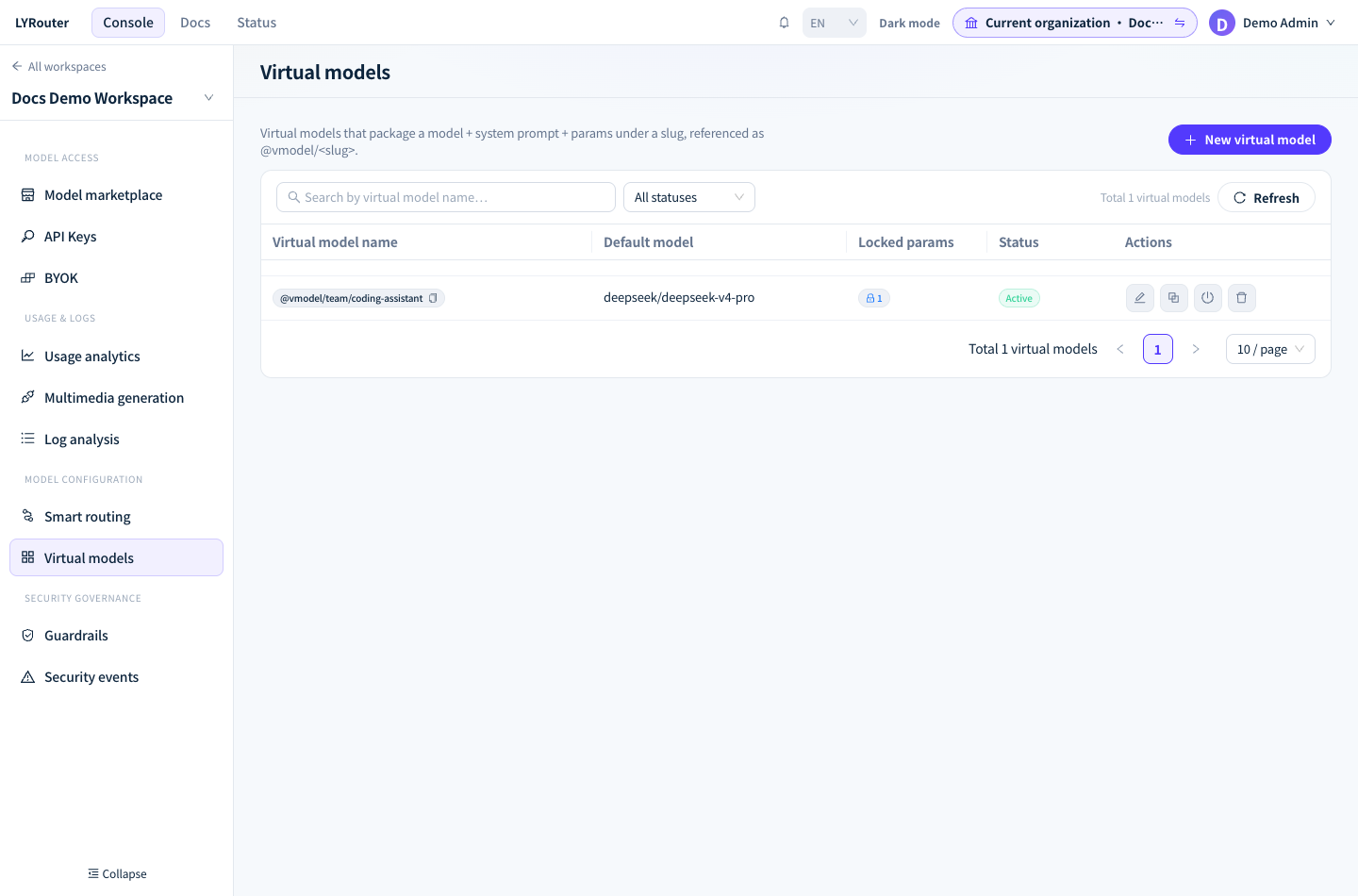
Figure 1: The virtual model list shows the copyable call name, primary model, locked params and status. Demonstration data; click the image for full size.
- Default model and Fallback models can be chosen from the model catalog or typed as model IDs. Saving does not check whether these models are usable in the workspace, and unusable models are skipped at call time. Before saving, make sure they are enabled in the model marketplace or served by a working BYOK.
- Once saved, the virtual model is Active and reaches the gateway within seconds; you do not need to change API keys. The Save and test button is not available yet, so send a call directly to verify.
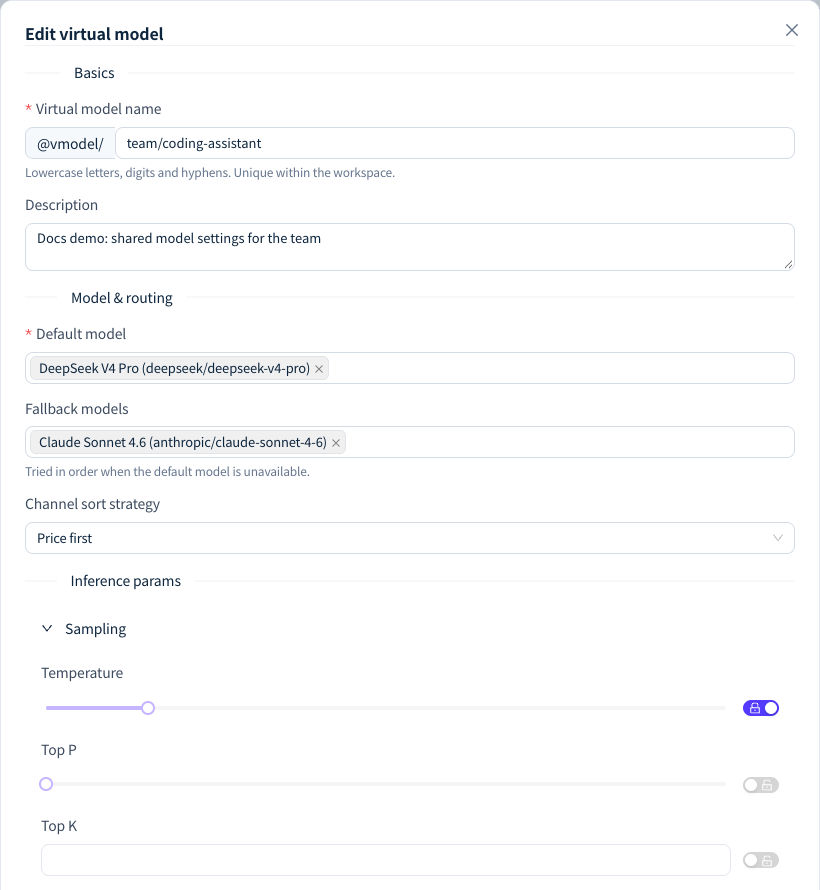
Figure 2: Set the primary model, fallback models and inference params in the virtual model configuration; call it by its actual name. Demonstration data; click the image for full size.
Common save errors
| Message | Cause |
|---|---|
| Virtual model name must match ^[a-z0-9][a-z0-9-]*$ | The name contains uppercase letters, spaces or Chinese characters, or starts with a hyphen |
| Please choose a default model | Default model is empty |
slug already in use in this workspace |
The workspace already has a virtual model with this name |
| The JSON Schema isn't valid JSON — please check the syntax. | The JSON Schema text of Response Format has a syntax error |
invalid preset params: response_format.json_schema.name is required ... |
The JSON Schema object lacks a non-empty name; see Inference params below |
| Please enter the function name | Tool Choice is set to Specific function, but no function name was entered |
Which model is actually called
The gateway tries models in the following order and moves to the next model only after every channel of the previous one fails:
- The virtual model's Default model (the primary model).
- The Fallback models, in the order entered. The gateway never moves a fallback model forward because it is faster or cheaper.
- The workspace's Default Model, if one is set in Smart routing.
When a model is served by several channels, they are sorted by the virtual model's Channel sort strategy; Prefer this Channel and Only use this BYOK set in BYOK still take precedence. The full fallback rules and the cases that never fall back are in Retries and fallback. The two most common are:
- When a guardrail model policy blocks the model actually selected, the request returns 403
Request blocked by guardrail policyat once, and no fallback model is tried. Guardrails check the actual model ID, so entering@vmodel/...in a model policy has no effect. - When the current model does not support the requested input or endpoint (for example, sending an image to a text-only model), the request returns 400 at once, and no fallback model is tried. Fallback models should therefore support the same input types and tool calling as the primary model.
Inference params: defaults and locks
An unlocked param is a default value; a locked param is enforced:
| State | Client did not send the param | Client sent the param |
|---|---|---|
| Unlocked | The virtual model's value is used | The client's value is used |
| Locked | The virtual model's value is used | The virtual model's value is used and overrides the client's |
| Group | Params | Values |
|---|---|---|
| Sampling | temperature, top_p, top_k, seed |
0 to 2; 0 to 1; integer ≥ 0; integer |
| Length | max_tokens, stop |
integer ≥ 1; string or array of strings |
| Penalty | frequency_penalty, presence_penalty, repetition_penalty |
-2 to 2; -2 to 2; greater than 0 |
| Output format | response_format |
text, json_object, json_schema |
| Reasoning control | reasoning_effort, enable_thinking, thinking_budget |
minimal/low/medium/high; true or false; integer ≥ 0 |
| Tools | tool_choice, parallel_tool_calls |
auto, none, required or a specific function; true or false |
| Streaming | stream, stream_options.include_usage |
true or false; true or false |
- Only params that have a value can be locked. Object params such as
response_formatandtool_choiceare replaced as a whole, not merged field by field. - Unlocked defaults are skipped automatically when they do not apply:
tool_choiceis not added when the request has notools, andresponse_formatset tojson_objectis not added when the word "json" does not appear in the conversation. Locked params are always written. - Params are merged as-is under their Chat Completions field names,
/v1/responsesrequests included. For example,max_tokensis not renamed tomax_output_tokens, and the upstream may return 400 as a result. For virtual models used by Responses clients, set only params both protocols share, such astemperatureandtop_p. streamchanges the response form: when it is set to true and applied, even non-streaming requests receive an SSE event stream.reasoning_effort,enable_thinkingandthinking_budgetbelong to different vendors, and the gateway does not convert between them; fill in the one supported by the primary model's vendor.- When Response Format is set to JSON Schema, enter the complete OpenAI
response_format.json_schemaobject, for example{"name": "answer", "schema": {"type": "object", "properties": {"text": {"type": "string"}}}}. Pasting only the schema itself fails to save. - A greyed-out control with the hint "Not supported by the current primary model" is only a console hint; the gateway does not strip params based on model capabilities.
When the system prompt is injected
| Endpoint | Injection rule |
|---|---|
/v1/chat/completions |
Inserted at the start when messages has no message whose role is system; not injected if one exists |
/v1/messages |
Injected when the request has no system; not injected if it has one |
/v1/responses |
Filled in when instructions is empty; appended after a blank line when it already has content |
The system prompt cannot be locked: when a Chat or Messages request brings its own system prompt, the virtual model's prompt does not apply. Messages with the developer role do not count as a system prompt. When the gateway moves to a fallback model, the prompt is injected once more and never stacked twice.
Editing, disabling and deleting
| Action | Effect on calls |
|---|---|
| Edit | New requests use the new configuration once saved. Changing the name changes the call name, and the old name stops working immediately |
| Disable | The status becomes Disabled; the gateway no longer recognizes the name, and GET /v1/models no longer lists it |
| Enable | The original name works again |
| Clone | Opens the create form prefilled with the full configuration and a -copy suffix on the name; nothing is created until you click save |
| Delete | Deleted permanently after you type the name to confirm; you can then create a new one with the same name |
After a virtual model is disabled, deleted or renamed, requests using the old name no longer match any virtual model. If the workspace has a Default Model, such chat requests are answered by it instead; otherwise they return 503 all routed candidates exhausted.
Verification and FAQ
After a call, open its record in the request logs. In the route trace, Virtual model shows the virtual model's name (without the @vmodel/ prefix), and Model (actual) shows the model that answered; see Inspecting request routing.
What should I check when a call returns 503 all routed candidates exhausted?
Answer: First check the spelling and case of @vmodel/<name>, then use GET /v1/models to confirm it is listed, which means it is enabled. If the name is correct, ask the Owner to confirm that Default model and Fallback models are enabled in the model marketplace or served by a working BYOK.
Why did a model outside the virtual model answer?
Answer: After the primary model and every fallback model fail, the gateway uses the workspace's Default Model. When the name is misspelled or the virtual model is disabled, chat requests are also answered by the Default Model directly. Model (actual) in the logs confirms this; if you do not want this fallback, ask the Owner to clear the Default Model in Smart routing.
The upstream returns 400 after I lock a param. What should I do?
Answer: Locked params are always written into the request, and an upstream that does not support one rejects it. Open Raw packets in the log, compare Upstream request with Upstream response to find the rejected param, then unlock or remove it.