Usage attribution and analytics
Usage analytics summarizes a workspace's requests, Tokens, cache hit rate and spend over a time range, and breaks them down by API key, department, user, model and intent, so you can see who is using what and how much it costs. Usage is attributed through the API key to the key's creator and the creator's department; members only see the keys they created. Amounts are shown in CNY: platform requests use the amount actually charged, BYOK uses supplier cost. To check a single request, use the logs; to check Credits charges, use Consumption.
Opening usage analytics
Open a workspace and click Usage analytics in the Usage & logs group of the sidebar. The data covers the current workspace; for totals across every workspace in the organization, go back to the console Overview page.
Three filters at the top apply to every tab:
| Filter | Options | Notes |
|---|---|---|
| Time range | Today, Yesterday, Last 7 days, Last 30 days, Last 90 days, Custom | Metric cards also compare against the previous period |
| Modality | Text, Image, Video | Text is measured in Tokens; images are counted per image and video per second, with usage and amounts shown together |
| Perspective | Usage, Cost | Available for Text only; switching it shows every tab by cost |
Data is near-real-time and is fetched again when the page loads or when you click Refresh. If a request you just sent is missing, refresh again shortly.
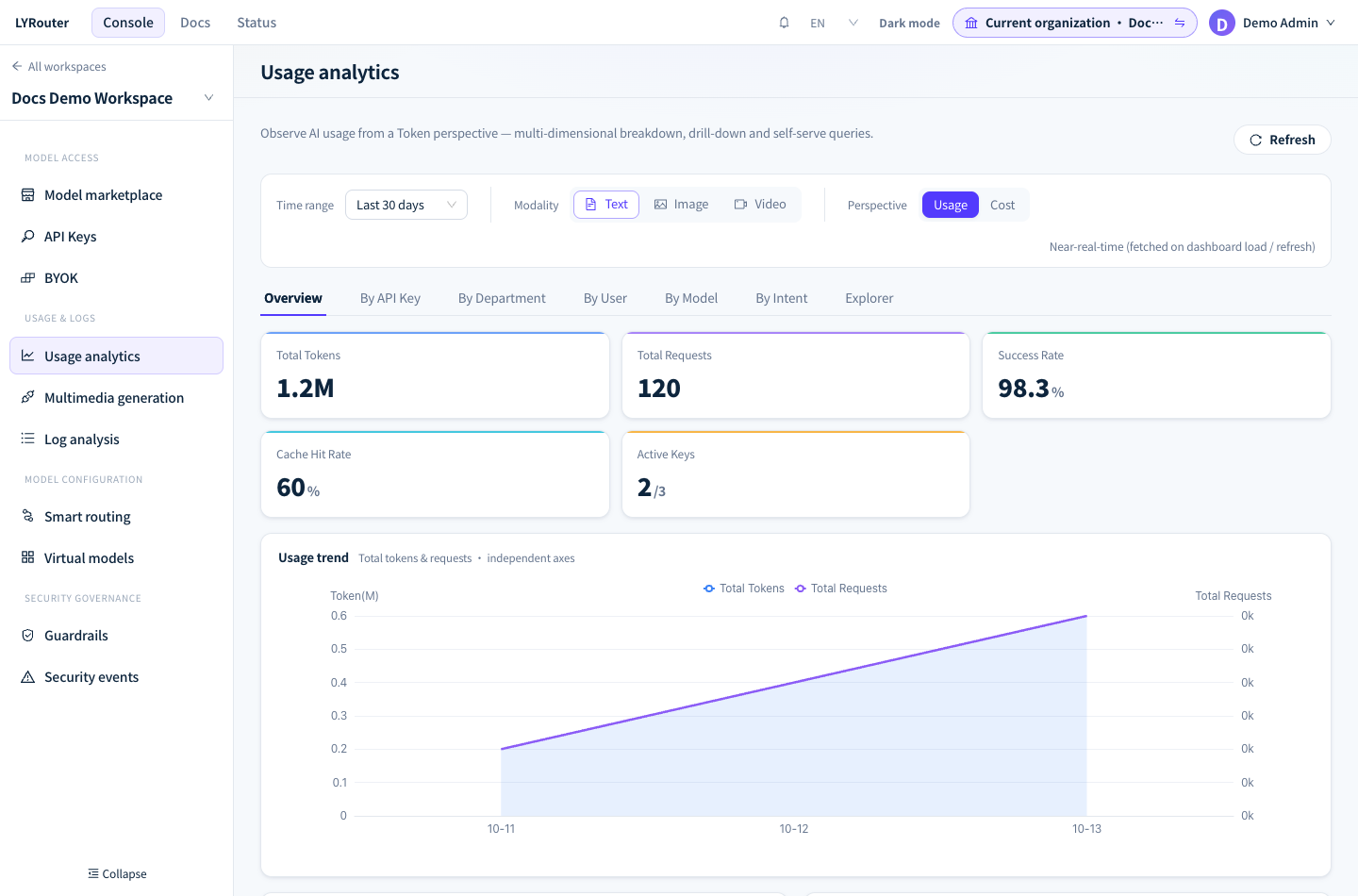
Figure 1: Choose the time range, modality and perspective first; the Overview shows Tokens, requests, success rate, cache hit rate and active keys. Demonstration data; click the image for full size.
Who sees what
| Role | Usage visible | By Department / By User |
|---|---|---|
| Owner of a personal edition | All usage in the workspace | Not shown |
| Current Account Owner of a team or enterprise edition | All usage in the workspace, including Top Departments and Top Users on the Overview | Shown |
| Account Members (including members who are workspace Admins) | Only usage and spend of API keys they created | Not shown |
A member who has not created an API key sees no data. In team and enterprise editions, the By API Key table includes a Creator column.
Tabs
| Tab | Contents |
|---|---|
| Overview | Metric cards, usage trend, model, vendor, client and intent distributions, and Top rankings; Vendor distribution can be filtered to platform or BYOK sources |
| By API Key | Usage trend and details per key; select a key to drill into its model and intent mix |
| By Department, By User | Usage per department or user, with drill-down |
| By Model | Usage trend and details per model, including provider, source, cache hit rate, success rate, P95 TTFT and throughput, across platform and BYOK sources |
| By Intent | Share and details of request intents such as development/debugging and Q&A |
| Explorer | Queries with your own grouping and sub-dimension, with CSV export; see below |
P95 TTFT counts successful streaming requests only.
How usage metrics are calculated
- Tokens: usage analytics shows Input (cache miss), Input (cache hit) and Output. The three do not overlap and add up to the Token total. Explicit cache write is not counted here; see it in the log details.
- Cache hit rate: Input (cache hit) ÷ (Input (cache miss) + Input (cache hit)), weighted by Tokens. A total row is calculated from summed Tokens, not by averaging row percentages, so rows with more Tokens weigh more. Ways to raise it are covered in Reducing costs and improving cache reuse.
- Total requests and success rate: a request with an HTTP status below 400 counts as successful. Requests rejected by the gateway before reaching an upstream are excluded from request counts and the success rate, for example an invalid or expired API key, an expired subscription, insufficient balance, rate limiting, a guardrail block or a model that is not enabled. You can still find them in the logs.
GET /v1/modelsmodel-list requests are excluded too. - Tokens and active keys: count successful requests only. Active Keys shows keys with successful calls in the range / keys currently enabled.
Cost perspective
With Perspective set to Cost, the page description reads "Token spend in CNY: platform requests show what the customer was actually charged (the same figure as their bill), while BYOK uses supplier cost." The Token Spend card on the Overview splits into three parts:
| Item | Meaning |
|---|---|
| Platform token spend | Credits actually charged for platform requests, converted to CNY at the rate frozen when each request was settled; matches Consumption request by request |
| BYOK token cost | Estimated cost of BYOK calls at supplier prices, paid by you directly to the supplier and not deducted from Credits |
| BYOK subscription cost | Subscription fees of subscription-based BYOK credentials (for example a Coding Plan), spread by day |
- BYOK subscription cost is not allocated: it only counts toward the workspace total and is not split across models, API keys, departments, users, intents or requests, so the dimension totals add up to less than the overall total. Members' spend does not include it.
- Requests without prices: a request missing billing information adds 0 to the totals, so totals can be slightly lower than the real amount.
- Older history: for periods before the platform started reporting amounts charged, platform request amounts are supplier cost estimates and may not match your bill.
- By model: in the cost perspective, By Model lists Input cost, Output cost, Cache cost and Fixed request cost.
Who usage is attributed to
- Attributed through the API key: every call is recorded against the API key used, then attributed to the key's creator and the creator's primary department. When several people share one key, you cannot tell who made a call; to account per person, give each person their own key, see Workspaces and API keys.
- Shared keys are listed separately: usage of shared keys visible to members or the whole workspace appears in By User and By Department as Shared apps · unattributed and is not charged to any person or department. Click that row for details.
- Former members keep their history: after a member leaves, their past usage stays under the original user and department. By User tags them as Removed (left the organization; the account still exists and can be invited again) or Deleted (the account was deleted from the platform). Deleted API keys also keep their usage and are tagged Deleted.
Explorer and CSV export
In Explorer, choose a Group by dimension (Model, Intent, API Key, Vendor, Client, Time; the current Account Owner also has Department and User), optionally a Sub (drill) dimension, then Sort by. Open Filters or Show chart if needed, and click Run for a detail table with a total row.
- Combination limits: API Key, User and Department cannot be combined with each other as group and sub-dimension; Intent combines only with Model, API Key, User and Department; grouping by Time allows no sub-dimension.
- Sub rows belong to their parent group: when grouping by model with vendor as the sub-dimension, each sub row is that model's usage on one vendor. Keep the scope in mind when comparing with model-level totals.
- Export CSV: after running a query, click Export CSV to export the group and sub rows of the current table. The usage perspective exports requests, the Token items, cache hit rate and success rate; the cost perspective exports requests, amount and cost share.
Compared with logs and Consumption
| Usage analytics | Logs | Consumption | |
|---|---|---|---|
| Scope | Totals for the current workspace | Individual requests in the current workspace | Individual charges across the organization |
| Requests included | Tokens from successful requests only; request counts exclude gateway rejections | Includes failed and gateway-rejected requests | Settled requests that were charged Credits |
| Amounts | CNY: platform as charged, BYOK at supplier cost | Cost of each request | Credits |
| Who can see it | All members; members see only their own keys | All members; members see only their own keys | Current Account Owner only |
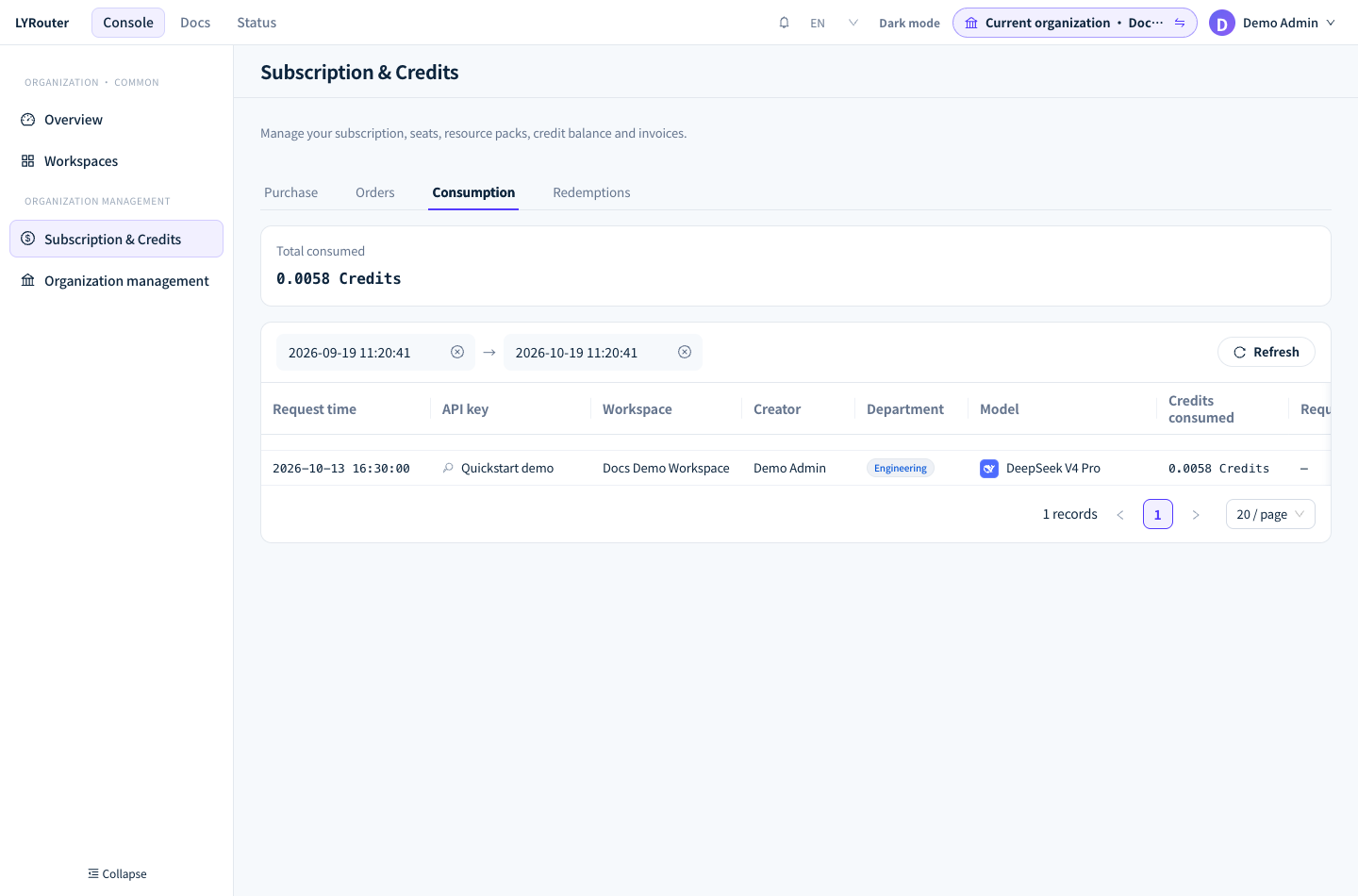
Figure 2: Consumption records each actual charge in Credits and can be compared with Platform token spend in analytics. Demonstration data; click the image for full size.
FAQ
Why does spend in analytics differ from Consumption?
Answer: First align the scope: analytics covers the current workspace, Consumption covers the whole organization, and Consumption only includes settled requests, so calls from the last few minutes may be missing. Also, BYOK token cost and BYOK subscription cost in analytics are supplier costs that are not deducted from Credits, so Consumption has no matching amount. Compare only Platform token spend with the converted Consumption amounts.
Why can't I see By Department and By User?
Answer: These two tabs are shown only to the current Account Owner of a team or enterprise edition. They are hidden for members and personal editions, and members see only data for the keys they created in the other tabs as well.
The logs show failed requests, so why hasn't the success rate dropped?
Answer: Requests rejected directly by the gateway (for example an invalid key, insufficient balance, rate limiting or a guardrail block) are excluded from request counts and the success rate and appear only in the logs. To troubleshoot them, follow the error message in the logs, see 401 / 403 and 429: rate limits and quotas.