Unexpected costs and cache misses
When a cost does not match your estimate, the most common reasons are that cache-hit input was counted again at the input price, a long-context request fell into a more expensive tier, thinking produced a lot of output, or the prompt cache missed. To troubleshoot, first read the four Token types in "Token usage" of the request logs detail, then go through the questions below one by one. Estimation is covered in Estimating costs and cache pricing, and ways to raise the hit rate in Reducing costs and improving cache reuse.
Start with the four Token types
Open the call in Log analysis. "Token usage" in the detail lists Input (cache miss), Input (cache hit), Output and Explicit cache write, and each share is calculated against the sum of the four. The call's cache hit rate is:
Cache hit rate = Input (cache hit) ÷ (Input (cache miss) + Input (cache hit))
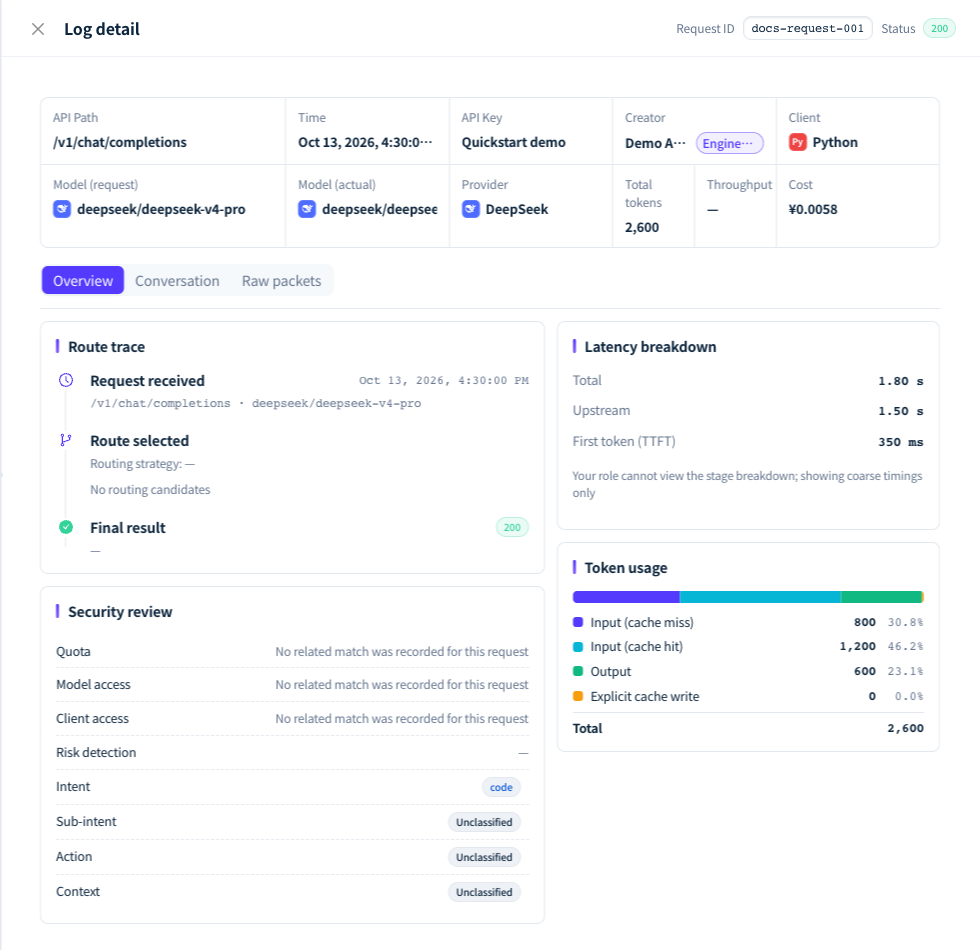
Figure 1: In Token usage, check cache-miss input, cache-hit input, output and explicit cache write separately. Demonstration data; click the image for full size.
Unexpected costs
Why does the cost I calculated from input Tokens differ from the log?
Answer: Usually because the input includes cache hits. usage.prompt_tokens in OpenAI-compatible responses already includes cache hits (the hit count is usually in prompt_tokens_details.cached_tokens), so multiplying it by the input price overestimates the cost. input_tokens in Anthropic-protocol responses excludes cache reads and cache writes, which are reported in cache_read_input_tokens and cache_creation_input_tokens. For /v1/chat/completions calls served by Claude or another Anthropic-protocol upstream, prompt_tokens in the response does not include cache hits either. When checking, go by the four types in the log, and price each one separately with the formula in Estimating costs and cache pricing.
The cache hit rate is high, so why am I charged the long-context price?
Answer: Models priced by Token length choose the tier from all input Tokens of the request, and cache hits count toward the length too. A long session of several hundred thousand Tokens falls into the long-context tier even if most of it hits the cache: the hits are charged at that tier's "Input (cache hit)" price and the misses at that tier's "Input" price. Keeping sessions shorter or starting new sessions periodically brings requests back to a lower tier.
Why are there far more output Tokens than the length of the answer?
Answer: The thinking (reasoning) process also counts as Output. When the workspace has content logging on, you can see the thinking and its Token count on the "Conversation" tab of the log detail. For tasks that do not need deep thinking, lower the thinking effort or turn thinking off in the request (the parameter differs by model), and cap the output with max_tokens.
I did not write cache_control, so why is there an Explicit cache write?
Answer: Explicit cache write appears only with Anthropic-protocol upstreams, and it has two possible sources: clients such as Claude Code mark cache breakpoints in requests automatically, and older virtual models with "Anthropic prompt caching" turned on add a marker to the system prompt when the request has none of its own. The cache write is charged at the "Explicit cache creation" price; when the same prefix is reused within the next few minutes, it is charged at the "Input (cache hit)" price, which usually saves money overall.
Cost in the log shows "Not calculated". Does that mean nothing was charged?
Answer: Usually, yes. "Not calculated" means the charge recorded for this log is 0 or missing, most often because the call failed; occasionally the price of the call could not be calculated. To confirm whether Credits were deducted, look up the Request ID under "Consumption" in Subscription & Credits: if it is not there, nothing was charged. When Cost in the log list shows "Settling", an async task has not finished yet; once it completes, the cost of the whole task is shown. "No permission to view" means the current account cannot see this log's cost.
Why don't the amounts in log cost, Consumption and usage analytics match?
Answer: The three are measured differently:
| Where | What it shows | Unit |
|---|---|---|
| Cost in the logs | The Credits actually charged for a single call, converted to an amount; for BYOK calls, the platform service fee | CNY |
| "Consumption" in Subscription & Credits | The Credits actually charged, listed per request; only requests that were charged appear | Credits |
| The "Cost" perspective of Usage analytics | Platform requests at the amount the customer actually paid; BYOK requests at provider cost, with BYOK subscription cost listed separately as unallocated | CNY |
The Request ID matches logs to Consumption entry by entry. When comparing totals, make sure the time range, workspace and API key are the same; calls that just finished may take a few minutes to appear in usage analytics and Consumption. For BYOK requests, usage analytics shows what you pay the provider, not the platform service fee, so it differs from the logs.
Why does the same usage cost different amounts at different times?
Answer: Check whether the price table uses "Time-based pricing": the multiplier differs by weekday and time slot, and public holidays and make-up workdays are treated by their day of the week. Also, each call is charged at the price in effect at the time; after a price change, new calls use the new price, while amounts in historical logs stay the same.
In older Claude logs, why is Input (cache miss) small or 0?
Answer: Older Anthropic-protocol logs recorded input Tokens without the cache hits. After the console subtracts the hits again, Input (cache miss) ends up too small or even 0, and "Total tokens" excludes the cache hits too. New logs record the whole input and are not affected. When comparing such logs, go by Input (cache hit) and Output.
Cache misses
Why did a similar request miss the cache?
Answer: The prompt cache is matched by byte prefix on the upstream provider's side: if any byte differs from the start of the request, nothing after it hits, even if the hundreds of thousands of Tokens that follow are identical. Common causes are a timestamp, request ID or random value at the start of the system prompt; tool definitions added, removed or changed mid-session; history messages reassembled or rewritten; and the request moving to another channel or model. The cache is reused only within the same model of the same provider, so switching the model or the provider means building it again.
The hit rate is always exactly 0. How do I troubleshoot?
Answer: It means the prefix differs from the very first byte. With content logging on, compare the beginning of "Upstream request" for two consecutive requests under "Raw packets" in the log detail. With Claude Code, some versions write a line containing a cch= marker at the very start of the system prompt, with a different value in every request, which drives the hit rate to 0; upgrading Claude Code to the latest version fixes it. What matters is whether this value changes between consecutive requests, not whether the line is there.
Why do the first one or two calls of each session miss?
Answer: The first call has to write the prefix into the upstream cache before later calls can read it. Some upstreams need a short delay after the write before it can be read, so a second call sent right after (for example, returning a tool result) may also miss. A hit rate that then rises steadily over later calls is normal.
Why does the hit rate of one session go up and down?
Answer: First check whether the prefix is being changed at various points, then whether the requests landed on the same channel. When the workspace's "Multi-channel routing strategy" is "Lowest Price" or "Load balanced", calls from the same API key to the same model stay on one channel for 30 minutes, renewed by every call; when the channel returns 429, 408, a 5xx or a connection failure, the binding moves to another channel, and the cache has to be built again there. "Lowest Latency" and "Highest Throughput" have no session affinity and choose a channel by the current metrics on every call. Keep each session on the same API key and the same model ID; see Channels and routing.
Explicit cache write is always 0. Is cache_control not working?
Answer: cache_control is used only for calls served by Anthropic-protocol upstreams. When the upstream uses the OpenAI-compatible protocol, the gateway removes these markers and the upstream's implicit caching takes over. If the call really is served by an Anthropic-protocol upstream, check whether the marked prefix reaches the model's minimum cacheable length, and whether the marker is on a text block: when you call /v1/messages, markers placed on image blocks or on tool_result blocks themselves are not forwarded upstream.
The first call after a pause missed. Did the cache expire?
Answer: Not necessarily. How long the cache is kept is decided by the upstream provider and is usually a few minutes; some upstreams have several backends, and a request that does not land on the backend holding the cache also misses. To judge whether it expired, look at the hits of the next several consecutive calls rather than a single one.
What to include when reporting a problem
Record the call time, the model, the API key name and the Request ID at the top of the log detail, and attach the four values in "Token usage" and the log's Cost. For questions about Consumption, also attach the matching "Request ID" and "Credits consumed".
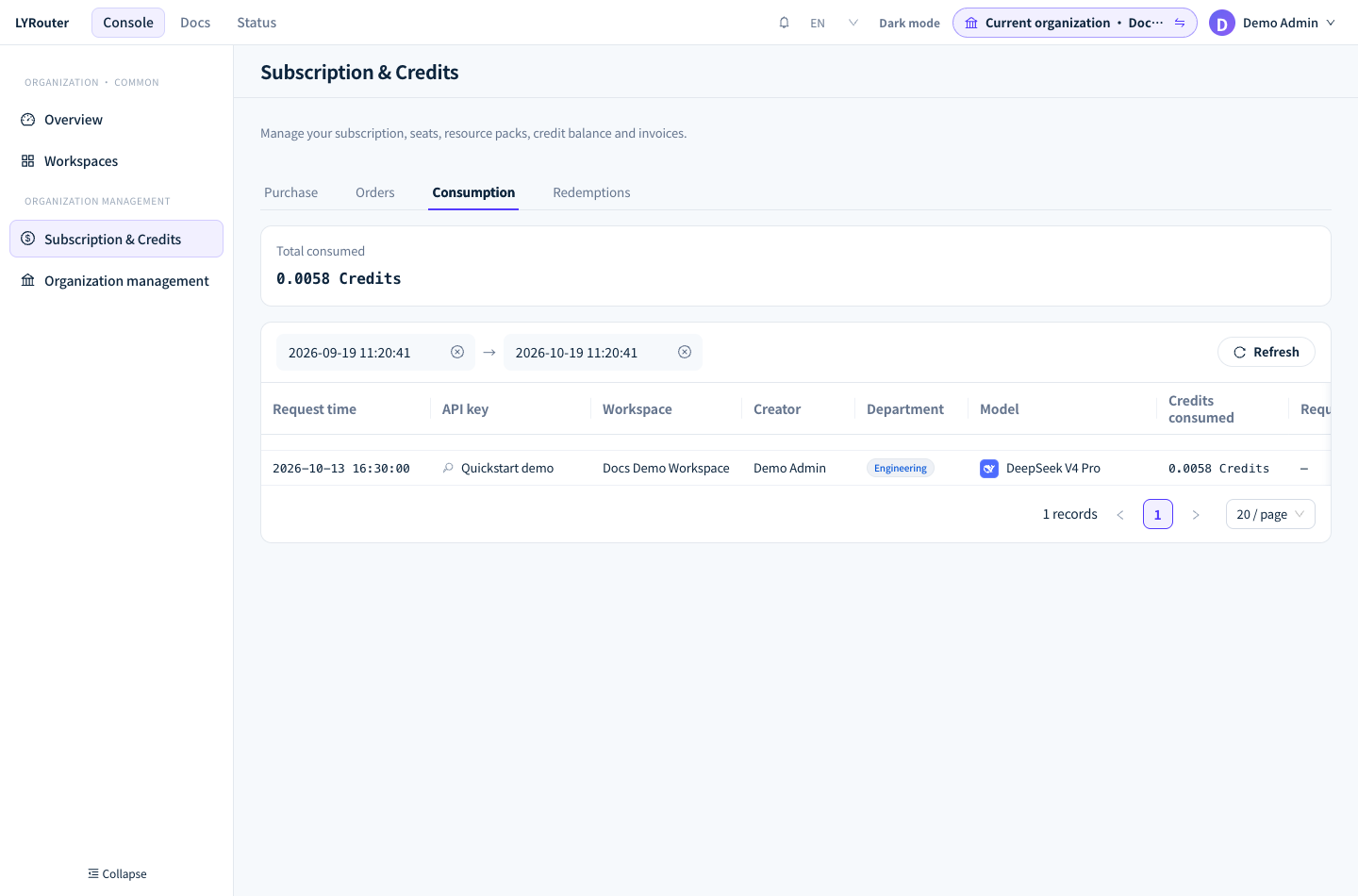
Figure 2: Line up request records with Consumption by time, model and API key. Demonstration data; click the image for full size.