Logs and data processing
The content of a model call passes through the LYRouter gateway to the selected upstream provider. By default, logs record only metadata, such as the model, provider, status code, Tokens, cost and latency; prompts, answers and packet bodies, redacted by the platform, are stored only after the workspace turns on "Store request and response content". This chapter covers what logs store, how to turn content logging on and off, what upstream providers receive, and who can view content and export logs.
What logs store
| Content | Content logging off | Content logging on |
|---|---|---|
| Metadata: time, API key, API path, model, provider, status code and status explanation, Tokens, cost, latency, client, sampling parameters, names of tools defined in the request, route trace, security review matches | Stored | Stored |
| Request and response headers of the four packets (except credential headers) | Stored | Stored |
| Prompts, conversation, answers and reasoning | Not stored | Stored (redacted) |
| Tool calls returned by the model (function names and arguments) | Stored | Stored |
| Bodies of the four packets | Not stored | Stored (redacted) |
| For failed requests, the upstream error response and the error response returned to the client | Stored (redacted, up to 64 KB each) | Stored (redacted) |
- With content logging on, each body is stored up to 1 MB; anything beyond that is truncated.
- Credential headers such as
Authorization,x-api-key,api-key,CookieandProxy-Authorizationare never stored. - When a guardrail matches, the security event keeps a short redacted snippet around the match as evidence, regardless of the content logging switch.
Turning content logging on or off
Content logging is set per workspace and is off by default. The current Account Owner and workspace Admins can change it; for other members the Log storage settings button is unavailable and shows "Only administrators can change content logging settings."
- On the workspace's Log analysis page, click Log storage settings to open "Log detail storage policy".
- Turn on "Store request and response content" and check each of the five information-processing notices:
- "I understand that request and response content will be stored after platform redaction."
- "I understand where the content is stored and that it remains within the configured data boundary."
- "I understand the retention policy and deletion process."
- "I understand which workspace roles may access the content."
- "I agree that the content is used only for debugging, analytics and security evidence described here."
- Click Save. If not every notice is checked, the console shows "Please acknowledge every information-processing item before enabling."
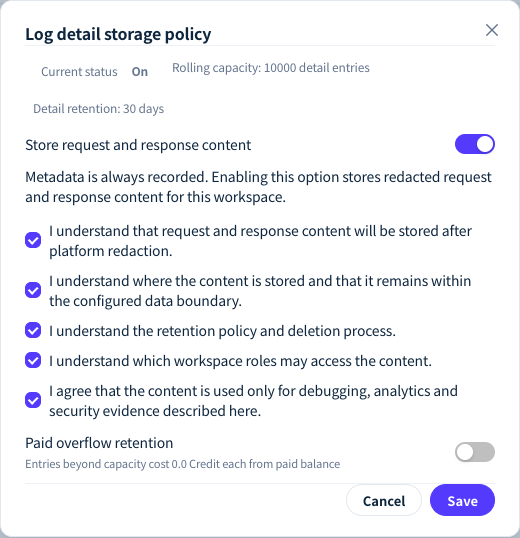
Figure 1: Turn on Store request and response content in Log detail storage policy and acknowledge the five information-processing notices. Demonstration data; click the image for full size.
- Current status: the Content logging tag in the toolbar shows On or Off. When it shows Unknown, the settings cannot be opened; refresh the page later and try again.
- New requests only: content is not stored retroactively for calls made before it was turned on, and the details of those logs show "Content was not recorded for this log".
- After turning it off: new requests no longer store content, and content already stored is still handled under the existing retention policy; for retention periods, see Retention, exports and deletion.
- Change record: every time it is turned on or off, the operator, the time and the acknowledged notices are recorded.
Platform redaction
Content stored by content logging and the error responses of failed requests are both redacted by the platform before they are stored, and log details that have content are marked "Content redacted by platform policy". Redaction follows fixed rules:
Bearertokens, keys beginning withsk-, and the values of fields namedapi_key,token,secret,passwordand the like;- Longer digit strings such as mobile numbers, ID card numbers and bank card numbers, of which only a few leading and trailing digits are kept;
- IP addresses, replaced with
[ip], and email addresses, replaced with[email]; - base64 content such as images, of which only the length and a checksum digest are stored, not the original data.
The rules cannot cover every kind of sensitive information; names and addresses, for example, are not recognized. When you handle highly sensitive data, keep content logging off.
What upstream providers receive
- What the call needs: messages, system prompt, parameters, tool definitions, and inputs such as images and audio. The gateway may convert the protocol or parameters to suit the provider; ② Upstream request under Raw packets in the logs is exactly what was sent to the provider.
- The gateway's credentials: the gateway calls the provider with platform credentials or your BYOK credentials; your LYRouter API key is never forwarded upstream.
- Log redaction does not change what is sent upstream. To hide sensitive information before it is sent, configure a Sensitive data policy in Guardrails and choose the Mask action.
To check whether a provider uses prompts for model training, open the model's detail page in Model marketplace and look at the shield icon next to the provider's name under Providers & pricing. Hovering over it shows:
| Tooltip | Meaning |
|---|---|
| "This provider does not use prompts for model training." | The provider states that prompts are not used for training |
| "Caution: this provider may use prompts for model training." | The provider may use prompts for training |
| "This provider has not disclosed whether it uses prompts for model training." | No statement is available; this does not mean the provider does not train on prompts |
The platform's rules for processing personal information are set out in the Privacy policy.
Who can view content and export logs
| Action | Current Account Owner, workspace Admin | Account Member |
|---|---|---|
| View logs | Logs of every API key in the workspace | Only logs produced by API keys they created |
| Conversation and the four Raw packets | Yes | Yes (own API keys only) |
| Route trace, and upstream packets grouped by attempt | Yes | Not shown |
| Export logs | Yes | No |
| Change content logging settings | Yes | No |
Export files contain the stored prompts, conversations, model responses and packet bodies, so downloading one requires verifying your bound phone number and confirming that you will keep it safe. The full steps are in Retention, exports and deletion.
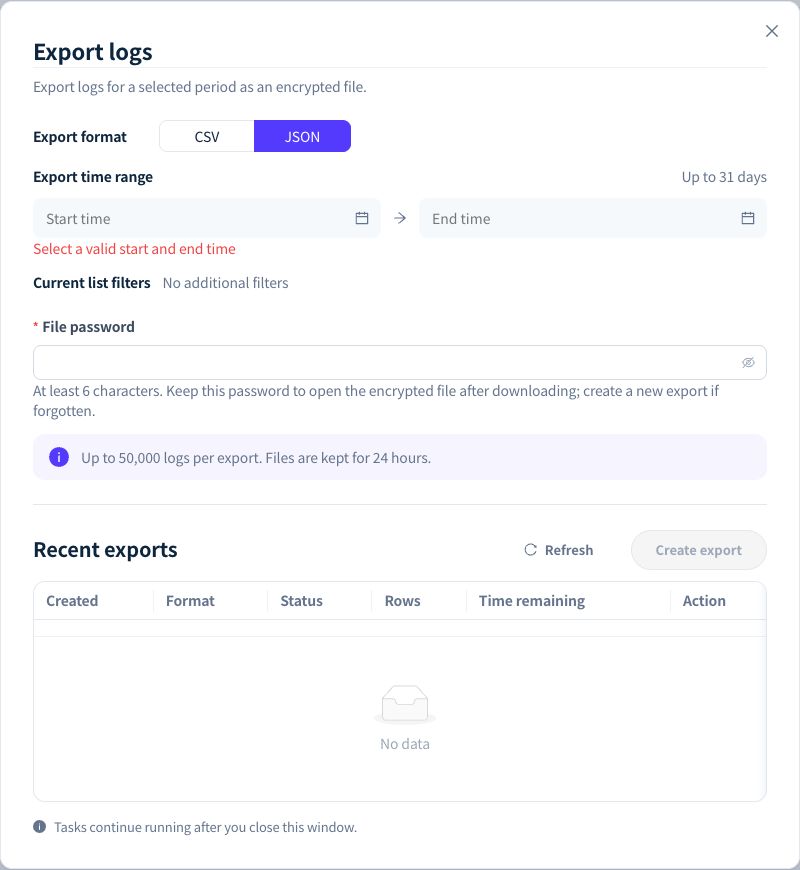
Figure 2: Log export creates an encrypted file for a time range and format, protected by a file password you set. Demonstration data; click the image for full size.
FAQ
After I turn on content logging, can I see the content of earlier requests?
Answer: No. Content logging applies only to new requests made after it is turned on; earlier logs have metadata only.
Content logging is off, so why can I see the response of a failed request?
Answer: For failed requests, the upstream error response and the error response returned to the client are stored separately (up to 64 KB each, redacted) for troubleshooting. Prompts and the answers of successful requests are not stored.
Can Account Members see other people's conversations?
Answer: No. Account Members can only view logs produced by API keys they created. The current Account Owner and workspace Admins can view the content of logs from every API key in the workspace, so make this clear within your team before turning on content logging.