Managing coding tools for a team
When you connect coding tools such as Claude Code and Codex for an engineering team, the recommended approach is: split workspaces by project or environment, give each member or application an API key it created itself, and enter the same virtual model name in every tool. Budgets, permissions, logs and usage can then be tracked per person and per application, and changing models does not require editing each machine's tool configuration.
Split workspaces by project or environment
A workspace is the unit that isolates call configuration, and each API key belongs to exactly one workspace:
| Scope | What it covers |
|---|---|
| Separate in each workspace | API keys, models enabled in the model marketplace, BYOK, Smart routing, virtual models, guardrail policies, content logging settings, logs and usage |
| Shared across the organization | Credits balance and subscription, plus members and departments |
In Team and Enterprise organizations, the current Account Owner creates workspaces with New Workspace on the Workspaces page, for example one for "Coding Assistant - Test" and one for "Coding Assistant - Prod". The maximum number depends on the subscription tier. The Personal edition has only one default workspace.
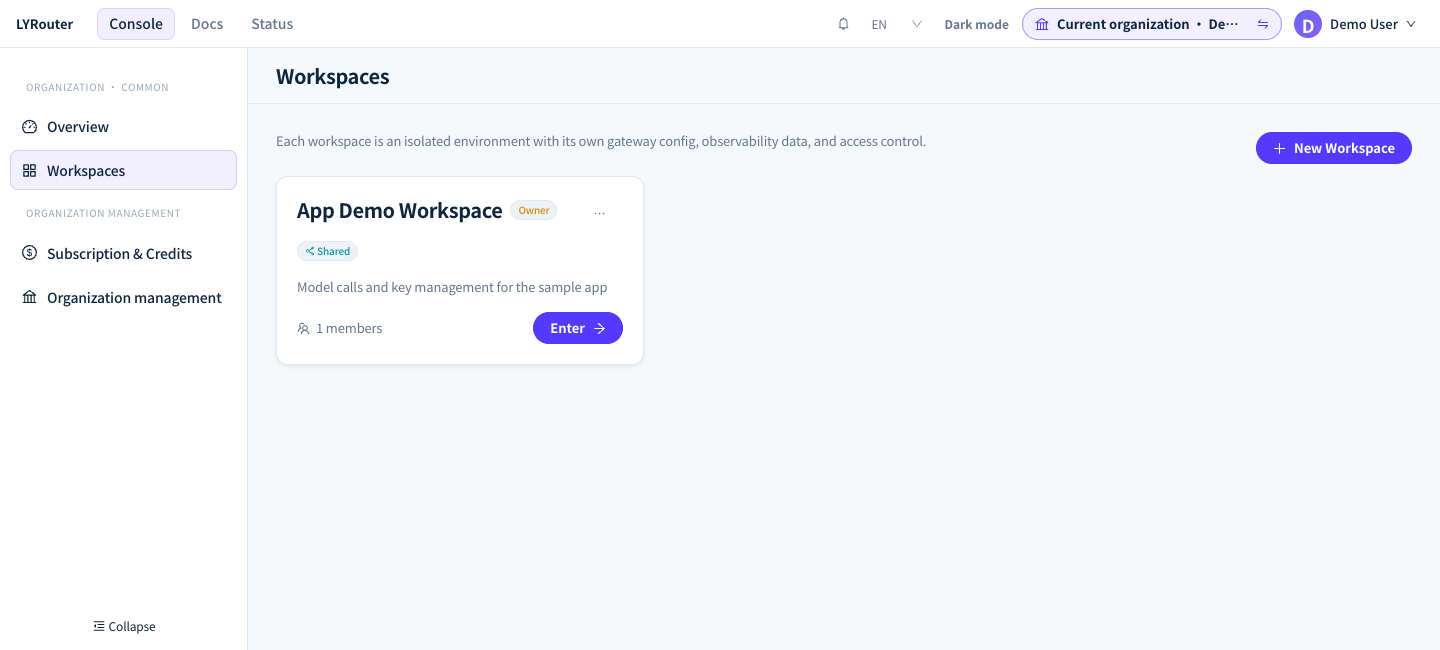
Figure 1: The Workspaces page lists the workspaces you can enter, and each card shows your role and sharing tag; the Owner can create workspaces. Demonstration data; click the image for full size.
Who has access decides who gets access automatically: Organization gives it to every active member of the organization, Departments gives it to members of the selected departments, and Private / Members gives it only to the Owner and members granted access individually. Members who get access through the first two options receive the Shared member role, which is Editor for any sharing set up now; sharing set to Viewer earlier stays Viewer until the access scope changes. When a member has both an individual grant and a shared grant, the individual grant takes precedence. The role inside the workspace decides what a member can do:
| Role | Capabilities relevant to connecting tools |
|---|---|
| Viewer | Views authorized resources in the workspace; cannot create API keys |
| Editor | Creates and edits their own API keys |
| Admin | Can also enable or disable models, and view and export the logs of all members |
For a production workspace, use Private / Members and grant Admin individually only to the people responsible. Managing members and access is covered in Teams, members and roles.
One key per person or application
Members whose workspace role is Editor or higher create keys with Create API Key on the API Keys page; the full key is shown only once. Keys created in the console are all "Only me": only the creator and the current Account Owner can see, edit, disable or delete them, and their usage is recorded under the creator. So have each member create keys with their own account instead of the Owner creating keys and handing them out; otherwise all usage is recorded under the Owner. Shared keys created earlier ("Specific members" or "Whole workspace") remain visible to the corresponding members, but these two options are no longer offered when you create a key.
Creating a key takes three steps:
| Step | Settings | Effect |
|---|---|---|
| Basic info | "Name" and "Expiry": "Never expires" or "Set expiry time", accurate to the second; if you pick only a date, the time defaults to 23:59:59 on that day | After expiry, calls return 403 api key expired |
| Budget limits | "Cost budget (¥)" and "Token budget (million tokens)", each with "Monthly" and "Total"; leave a field empty for no limit | Once used up, calls return 429 rate limit exceeded on apikey ... |
| Access control | "Enable IP allowlist", then enter IPv4 addresses or CIDR ranges | Requests from other sources return 403 your IP address is not allowed |
Turn on the IP allowlist for applications such as CI that have a fixed egress address, and set an expiry time for temporary members. How to handle these errors is covered in 401 / 403: authentication and access and 429: rate limits and quotas. To rotate a key, create the new key, update the tool configuration and confirm that calls work, then disable and delete the old key.
Generate tool configuration with Use key
After the key is generated, copy it in the "Save your secret key" window, check "I have copied and safely stored this key", then click I've saved it — show setup examples. The "Use this API key" window shows configuration with this key already filled in. You can also open it later with Use key in the actions column of the list; the examples then show the key as YOUR_API_KEY, which you replace with the full key you saved.
| Tab | Content | Base URL |
|---|---|---|
| cURL | A chat request and a request that lists available models | https://api.lyrouter.com/v1 |
| API | The OpenAI SDK for Python and Node.js, and the Anthropic SDK | The OpenAI SDK uses /v1; the Anthropic SDK uses the root address https://api.lyrouter.com |
| TRAE, WorkBuddy | The provider, base URL, key and model to enter in the tool | https://api.lyrouter.com/v1 |
| CC Switch | 供应商名称 (Name) (the provider name), base URL, Auth Token and default model |
Root address |
| Claude Code | Environment variables for macOS / Linux, Windows CMD and PowerShell, plus ~/.claude/settings.json |
Root address |
| OpenCode | Two ways to configure it: opencode.json and environment variables |
opencode.json uses /v1; the environment-variable setup uses the root address |
"Sample model" at the top of the window lists only the models this key can call. Tools that use the Anthropic protocol append /v1/messages themselves, so enter the root address; adding /v1 returns 404. For Codex, ChatGPT and other tools, see Tools and compatibility.
Use one virtual model name in every tool
Ask the current Account Owner to create a virtual model for the team on the Virtual models page, for example team-coding, and have everyone set the model in their tools to @vmodel/team-coding. To change models later, only the virtual model's Default model needs to change; after saving, it applies to new requests from every member.
- Coding tools rely on tool calls and streaming output, so the Fallback models must support them too.
- A virtual model's inference parameters are merged using Chat Completions field names. When it is used by tools that call Responses, such as Codex, set only generic parameters such as
temperatureandtop_p. - A virtual model belongs to one workspace, and any active API key in that workspace can call it. Configuration is covered in Virtual models.
Set team quotas
An API key's budget limits only that one key. To control usage per member, per department or for the whole workspace, the Owner creates a Quota policy in Guardrails; to limit which models members or keys can call, use a Model access policy. Guardrails are available from the Team edition up; see Budgets, quotas and rate limits and Model access. Members can check their remaining quota in My quota on the console's Overview page.
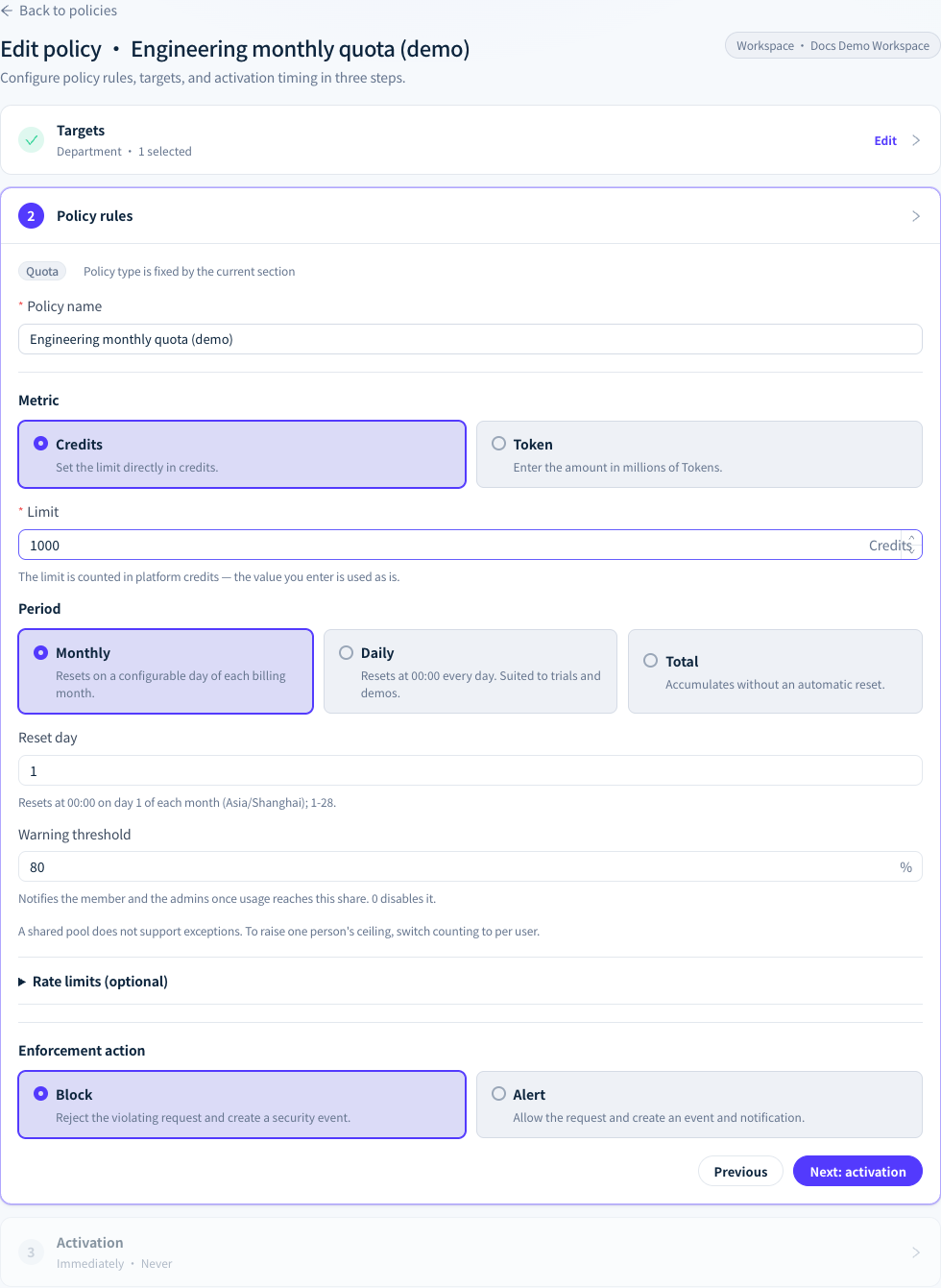
Figure 2: In a guardrail quota policy, set a department's monthly Credits limit, reset day, alert threshold and enforcement action. Demonstration data; click the image for full size.
Track usage by person and application
- Log analysis: members see calls made with keys they created; workspace Admins and the Owner see all calls. Team and Enterprise logs have a Creator column, the Department column can be turned on under Columns, and you can filter by API key, creator and department.
- Usage analytics: the By API Key tab compares usage across keys; the Owner also sees By Department and By User. Other members (including workspace Admins) see only the usage of keys they created.
- Attribution of shared keys: Creator in the logs is the person who created the key, not the person who actually made the call. By User and By Department in Usage analytics list the usage of shared keys separately as "Shared apps · unattributed"; to track usage per person, use personal keys.
Reconciliation and auditing methods are covered in Budget attribution and auditing.