429: rate limits and quotas
A 429 has three sources, told apart by error.message: a quota or budget is used up, the API key was temporarily circuit-broken for a high error rate, or every upstream credential for the model has reached its limit. Each one is handled differently, and retrying alone does not fix a used-up quota.
Identify the type first
Error message (error.message) |
error.code |
Cause | Fix |
|---|---|---|---|
rate limit exceeded on <subject> <metric>/<window> |
— | A guardrail quota policy or the key's budget has reached its limit | Call again after the reset time, or ask an administrator to raise the limit |
API Key 因最近 60 秒错误率过高已临时熔断,请在 N 秒后重试。 (The API key has been temporarily circuit-broken because its error rate over the last 60 seconds was too high; retry in N seconds.) |
api_key_circuit_open |
Many recent requests from this key failed, so the gateway temporarily circuit-broke it | Fix the cause of the failures first, then wait as long as Retry-After says |
all upstream credentials for this model are rate limited |
upstream_quota_exhausted |
Every channel or credential that can serve this model has reached its own limit | Retry later, or switch to another model |
In addition, a 429 returned by the upstream provider itself is forwarded as is after the gateway has tried every candidate, and the source in the Status explanation column of the logs shows Upstream.
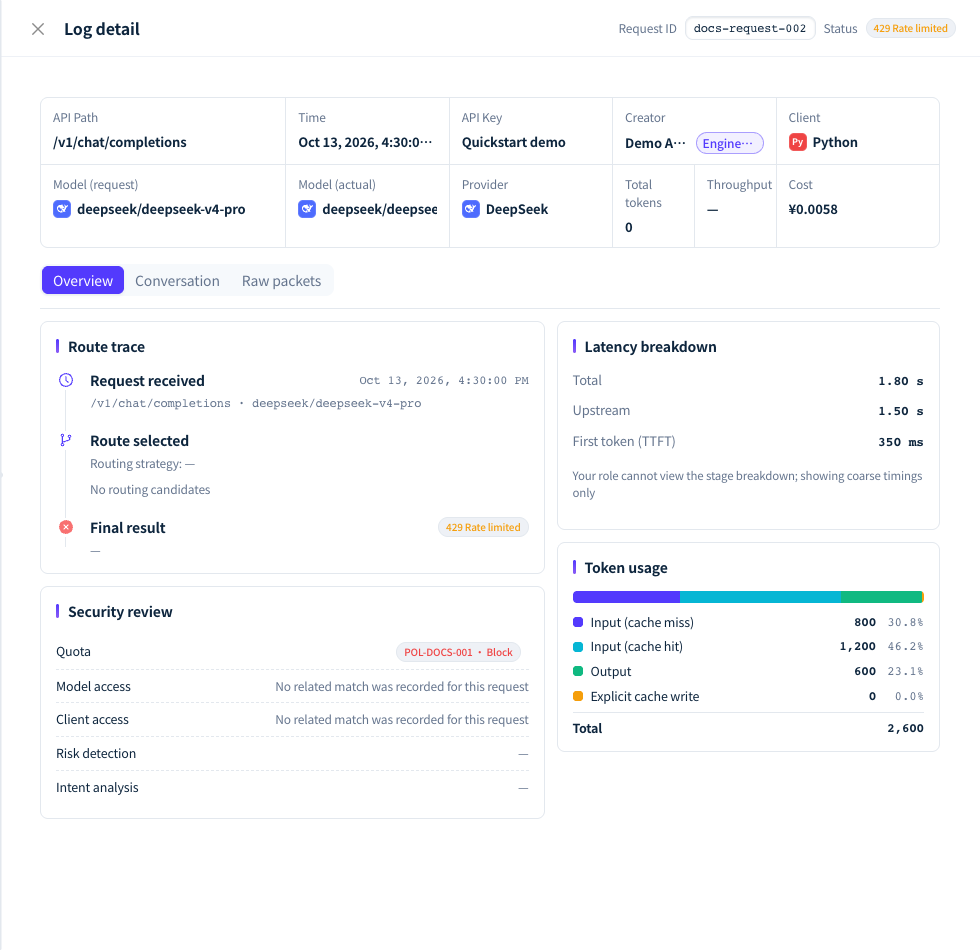
Figure 1: The 429 example shows a gateway-side rejection; read the specific error first, then check the matching limit. Demonstration data; click the image for full size.
Quota or budget used up
The three parts of the error message tell you which limit was used up. For example, rate limit exceeded on apikey total_tokens/day means this key has reached its token limit for the day:
| Part | Possible values |
|---|---|
| Subject | apikey (API key), member (member), dept (department), ws (workspace) |
| Metric | requests (request count), total_tokens, prompt_tokens, completion_tokens (token counts), credits (Credits) |
| Window | minute, minutes (N minutes), day, month, total (cumulative, never resets) |
- The error body also carries
limit(the limit),used(the amount used) andreset_at(the reset time).reset_atis 1 to 2 minutes later than the actual end of the window, so a retry after it is not rejected early. - Time windows are aligned to Beijing time, and
dayresets at 00:00 every day. Thetotalwindow never resets; only an administrator can raise its limit. - Usage is counted only after a request completes, so the request that crosses the limit still completes normally, and the next one is rejected.
- This kind of 429 has no
Retry-Afterheader.
Check remaining quota: the My quota card on the console's Overview page shows the quotas that apply to you, how much remains and when they reset. When quotas are configured, responses to calls that go through gateway routing and the quota check (chat, embeddings and the like; both successful responses and quota 429s) carry the response headers x-aigw-quota-<metric>-limit, x-aigw-quota-<metric>-remaining and x-aigw-quota-<metric>-reset, where the metric is credits, tokens, requests and so on. Programs can use them to slow down ahead of time.
Raise the limit: the key's creator changes the key's budget in the API key settings; the Account Owner changes member, department and workspace quotas in Guardrails. See Budgets, quotas and rate limits.
Error-rate circuit breaker
When the same key has at least 100 requests in the last 60 seconds and more than 90% of them fail (HTTP status ≥ 400), the gateway temporarily circuit-breaks the key:
- The
Retry-Afterresponse header gives the number of seconds to wait, andretry_afterandblocked_untilin the error body match it. The key recovers automatically when the time is up. - Each trip lasts longer than the one before: 30 seconds the 1st time, 2 minutes the 2nd, 10 minutes the 3rd and 12 hours the 4th, and the 5th trip bans the key permanently: later requests return 403
api_key_permanently_banned. The message is first该 API Key 因多次高错误率请求已被永久封禁,无法恢复,请删除后创建新的 API Key。(This API key has been permanently banned after repeated high-error-rate requests and cannot be restored; delete it and create a new API key.), and once the ban has synced to the gateway it becomes该 API Key 已被永久封禁,无法恢复,请删除后创建新的 API Key。(This API key has been permanently banned and cannot be restored; delete it and create a new API key.). Both mean the same thing. Trips accumulate over the key's whole lifetime and are never reset. - 402, 403 and 429 responses returned by the gateway itself also count as failures. A program that keeps retrying after an insufficient balance or a rate limit quickly trips the breaker on its key.
- Circuit-broken requests are not written to the logs.
Use 401 / 403, Unavailable models and the other chapters to find and fix the cause of the persistent failures, then retry after the Retry-After wait.
Upstream limits
upstream_quota_exhausted means every available channel or credential for the model has reached its own limit, so the gateway removed them from the candidates while sorting. Retry later, or switch to another model. If the model uses only your BYOK credentials, ask the Owner to check the quota and limit settings of those credentials with the provider, or to connect more credentials; see BYOK.
FAQ
Can I retry a 429 automatically?
Answer: Yes, but handle each type differently. For the circuit breaker, wait as long as Retry-After says. For a used-up quota, wait until after reset_at; retrying earlier only keeps failing and counts toward the circuit breaker. For upstream limits, use capped exponential backoff with random jitter. Never retry a 429 automatically without a delay.
What if I still get 429 after reducing concurrency?
Answer: Concurrency affects only frequency-based limits. If the metric in the error message is tokens or Credits, the quota is used up; reducing concurrency does not help, and you need to wait for the reset or raise the limit. If the error is upstream_quota_exhausted, the upstream credentials' limits are full, and you can switch to another model.
What should I include when reporting a rate-limit problem?
Answer: Responses do not carry a request ID. Record the call time, model, API key name and the full error message (including limit, used and reset_at); if you can find the request in the request logs, add the Request ID from the top of the log detail. Circuit-broken requests are not written to the logs.