Multimodal capabilities
Besides text chat and embeddings, the gateway supports vision (image input), image generation and editing and video generation. For the text endpoints (chat/completions, embeddings) see Calling the gateway.
This page covers every multimodal model currently callable on the gateway, one by one: endpoint, every parameter (with ranges and defaults), how it is billed, and a runnable example.
The authoritative model list is the model marketplace in the console, or
/v1/models. This page is refreshed as models are onboarded, so a very recently added model may not be here yet.
Model overview
Image generation / editing (synchronous — the image comes back in the response)
| Model | Endpoint | Handling | Billing |
|---|---|---|---|
bytedance/doubao-seedream-5.0-pro |
/v1/images/generations |
Pass-through | Per image, tiered |
bytedance/doubao-seedream-5.0-lite |
/v1/images/generations |
Pass-through | Per image, one tier |
openai/gpt-image-2 |
/v1/images/generations/v1/images/edits |
Pass-through | Per token, 4 items |
openai/gpt-image-2.5-flare |
same | Pass-through | Per token, 3 items |
openai/gpt-image-2.5-sunburst |
same | Pass-through | same |
google/gemini-3-pro-image |
same | Translated | Per token, 3 items |
google/gemini-3.1-flash-image |
same | Translated | Per token, 2 items |
Pass-through still drops a few parameters on the generation endpoint (/v1/images/generations): the GPT-Image family always drops response_format, and the two 2.5 models also drop stream / stream_options. Dropped parameters are listed in the X-Gateway-Unsupported-Parameters response header. The edit endpoint (/v1/images/edits) does not drop them; they are forwarded upstream (and when only stream: true is sent, the gateway currently adds stream_options as well, which the upstream rejects with 400), so do not send them.
For GPT-Image the "4 items" are input text / input image / output / cache read; usage from the 2.5 family has no cache fields, so it has only the first three. For Gemini the "3 items" are input / output / thinking; only Pro produces thinking tokens, so Flash has only the first two. Seedream pro bills reference images (input images) as a separate item, and the first one in each request is free. Tiers are documented per model.
Video generation (asynchronous tasks)
| Model | Endpoint | Handling | Billing |
|---|---|---|---|
bytedance/doubao-seedance-2.5 |
/v1/videos |
Translated | Per token, resolution × video input |
bytedance/doubao-seedance-2.0-fast |
/v1/videos |
Translated | Per token, by video input |
bytedance/doubao-seedance-2.0-mini |
/v1/videos |
Translated | same |
minimax/minimax-h3 |
/v1/videos/v1/videos/regenerations/v1/videos/context |
Translated | Per second, by resolution |
minimax/minimax-h3-max⚠️ Taken offline by the provider and currently unavailable; use minimax/minimax-h3 instead |
/v1/videos |
Translated | Per second, by resolution |
MiniMax upscaling (/videos/regenerations) is its own tier and reference images are a separate item; context enhancement (/videos/context) produces text and is billed per token.
[!important] This page does not quote prices. They change with commercial decisions and differ between environments (staging vs production) — take the live price from the model marketplace in the console, and the actual charge per call from Logs.
What this page does document is the billing shape: what is metered (images / tokens / seconds), which items are billed separately, and which dimensions create tiers. That shape is part of the interface contract and does not move when prices do.
Vision (image in, text out)
Standard /v1/chat/completions with any chat model carrying the "vision" capability tag — see the Vision section below.
Authentication is the same as every other call: use your gateway key as the bearer token. The gateway resolves your workspace from it and injects the upstream credential (your key is never forwarded upstream):
Authorization: Bearer sk-your-key
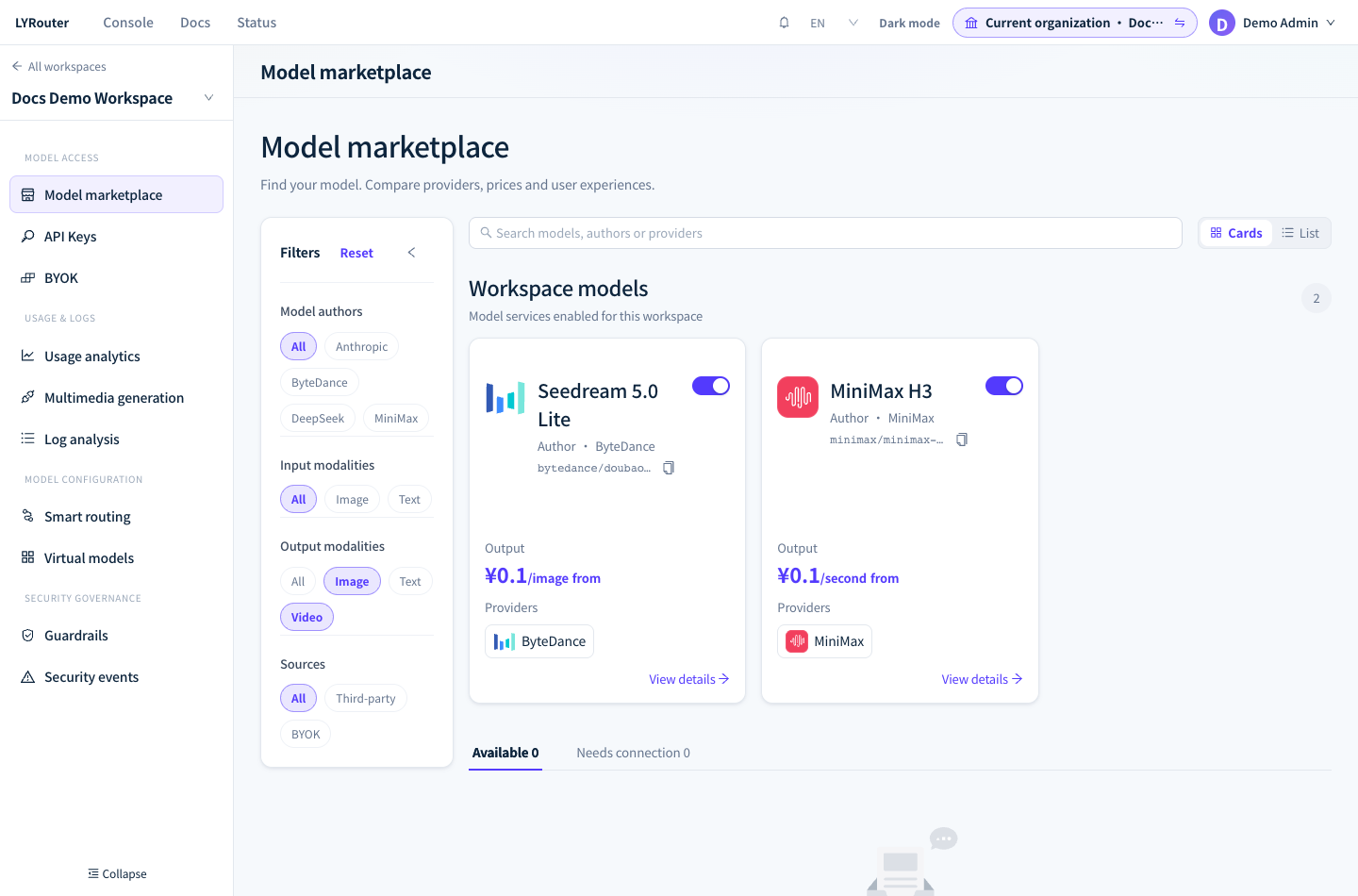
Figure 1: Select image and video output modalities to inspect available multimodal models and their pricing units. Demonstration data; click the image for full size.
Request handling: pass-through vs contract translation
Read this before the parameter tables. Whether a given parameter takes effect depends on which mode the model uses.
| Mode | What the gateway does | Whose docs to follow |
|---|---|---|
| Pass-through | Forwards the body unchanged, rewriting only the model name | The vendor's native parameters |
| Contract translation | Translates the gateway's unified parameters into the vendor's private shape | The gateway contract (listed per model below) |
Neither mode silently swallows a parameter:
- Under contract translation, parameters outside the contract are dropped and listed in the
X-Gateway-Unsupported-Parametersresponse header (Gemini image models forward onlyprompt,model,imageandsize, and treat everything else this way). For video models, a parameter in the contract that this model does not support makes the request return 400 with a reason. The exceptions are described under "Common video parameters (gateway contract)" below: Seedance'sreference_audiois dropped silently, and a few fields are not handled as expected when the request is submitted as a form. - If you would rather fail than be silently rewritten, send
X-Gateway-Strict-Parameters: trueand a dropped parameter makes the request return 400 witherror.code = unsupported_parameters.
One class of parameter is dropped even on pass-through models: one that can only make the upstream request fail while it cannot change the result. Today this happens only on the GPT-Image family's generation endpoint:
response_format(the family always returns base64, and the upstream flips between accepting and rejecting the parameter), plusstream/stream_optionson the two 2.5 models (the upstream starts streaming and the request fails). The drop is still reported inX-Gateway-Unsupported-Parameters, and withX-Gateway-Strict-Parameters: trueit still returns 400. The edit endpoint does not drop them.
Vision (image input)
Image input uses the standard chat/completions with an image_url part (data: base64 or a public URL), identical to the OpenAI multimodal format:
curl https://api.lyrouter.com/v1/chat/completions \
  -H "Authorization: Bearer sk-your-key" \
  -H "Content-Type: application/json" \
  -d '{
    "model": "a vision-capable model",
    "messages": [{
      "role": "user",
      "content": [
        { "type": "text", "text": "What is in this picture?" },
        { "type": "image_url", "image_url": { "url": "https://example.com/cat.jpg" } }
      ]
    }]
  }'
Pick a model with the vision capability tag in the marketplace. Sending an image to a text-only model is rejected upstream.
Image generation and editing (synchronous)
Two endpoints, identical to the OpenAI image API. The image comes back in the response; no polling.
POST /v1/images/generations    text to image
POST /v1/images/edits          image to image / editing
Latency differs widely between families. Seedream takes about 20 s; one GPT-Image generation took about 20–60 s in measurements (about 83 s at most), and a 400 caused by a bad parameter on the generation endpoint came back within 2 s; Gemini 3 Pro took 20–250 s, and occasionally had not returned after 300 s. Set client timeouts in minutes, not the 30 s you use for text.
The response is the OpenAI shape, with artifacts in a top-level data[] array:
{
  "created": 1760000000,
  "data": [ { "b64_json": "…" } ],
  "usage": { "input_tokens": 13, "output_tokens": 196, "total_tokens": 209 }
}
Basic usage
Text to image:
curl https://api.lyrouter.com/v1/images/generations \
  -H "Authorization: Bearer sk-your-key" \
  -H "Content-Type: application/json" \
  -d '{
    "model": "bytedance/doubao-seedream-5.0-lite",
    "prompt": "a shiba inu in sunglasses on a surfboard, sunset ocean, cinematic",
    "size": "2K"
  }'
Editing (multipart/form-data, original image as a file part):
curl https://api.lyrouter.com/v1/images/edits \
  -H "Authorization: Bearer sk-your-key" \
  -F model=openai/gpt-image-2 \
  -F quality=medium \
  -F image=@cat.png \
  -F prompt="replace the background with snowy mountains"
Editing (JSON form) — the image goes in the JSON body as base64:
curl https://api.lyrouter.com/v1/images/edits \
  -H "Authorization: Bearer sk-your-key" \
  -H "Content-Type: application/json" \
  -d '{
    "model": "google/gemini-3-pro-image",
    "prompt": "replace the background with snowy mountains",
    "image": "data:image/png;base64,iVBORw0KGgo…"
  }'
image takes either a single string or an array of strings (several reference images).
The two Gemini models now accept both bodies (since 2026-10-09). Their upstream is Google's native
generateContent, which takes JSON only (the picture must arrive asinlineData) — on a multipart request the gateway first normalises it into a field table, then translates it into that contract, so the official OpenAI SDK'simages.edit()drives them too.This path did not work before. The older "Gemini accepts JSON only" wording, here and in earlier versions of the spec attachment, is out of date.
Which body each model accepts (measured 2026-10-09):
| Model | multipart (file upload) | JSON (base64) |
|---|---|---|
openai/gpt-image-2 |
✅ | ✅ |
openai/gpt-image-2.5-flare |
✅ | ✅ |
openai/gpt-image-2.5-sunburst |
✅ | ✅ |
google/gemini-3-pro-image |
✅ | ✅ |
google/gemini-3.1-flash-image |
✅ | ✅ |
For pass-through models (the GPT-Image family) the multipart path locates and rewrites only the
modelfield and does not touch a single byte of the file part. For contract-translation models (the Gemini family) it is the opposite: the gateway parses the multipart body, turns the file part into base64 and rebuilds the request in that model's contract — which is why it carries a 30 MB inline limit. The JSON path follows the same split: for the GPT-Image family the JSON body is forwarded unchanged and the upstream validates the image; for the Gemini family the image format comes from the MIME declared in the data URI, falling back to byte-signature detection for PNG / JPEG / WEBP / GIF on raw base64, and when neither works you get a 400 naming which image failed — the gateway will not pick a default format for you. Note also that the upstream validates the image itself: a corrupt image or one in an unsupported colour mode comes back asInvalid image file or mode, which is the picture's problem, not an unwired endpoint. Seedream does image-to-image through theimageparameter on/v1/images/generationsinstead.
Every model's full parameter set follows. Check its handling mode first — pass-through models follow the vendor's docs, contract-translation models follow the gateway contract.
Seedream 5.0 pro / lite (Volcengine Ark)
Both are pass-through — the parameters below go upstream unchanged, so whatever the vendor supports, you can use.
Capabilities
| Capability | doubao-seedream-5.0-pro |
doubao-seedream-5.0-lite |
|---|---|---|
| Text to image | ✓ | ✓ |
| Text to image set (several at once) | not yet | ✓ |
| Single / multi image to image | ✓ | ✓ |
| Single / multi image to image set | not yet | ✓ |
| Interactive editing (coordinate-targeted) | ✓ | ✗ |
| Layer decomposition (base + up to 16 layers) | ✓ | ✗ |
| Streaming output | not yet | ✓ |
| Web search | not yet | ✓ |
| Resolution tiers | 1K, 1.5K, 2K |
2K, 3K, 4K |
| Output formats | png, jpeg |
png, jpeg |
| Prompt optimisation modes | standard, fast | standard |
| Output count limit | one image, or 1 base + up to 16 layers | reference images + generated images ≤ 15 |
| Rate limit | 500 images/min | 500 images/min |
Parameters
| Parameter | Type | Default | Values | Notes |
|---|---|---|---|---|
model |
string | — | see above | required |
prompt |
string | — | — | Optional for layer decomposition (the model picks the elements itself) |
image |
string / string[] | — | image URL or data:image/<fmt>;base64,<data> |
Reference image. No more than 10 recommended for generation (the provider currently does not reject more, but the output may be abnormal); exactly 1 for layer decomposition |
size |
string | 2K (generation) / auto (layers) |
see below | The two notations cannot be mixed |
response_format |
string | url |
url, b64_json |
|
output_format |
string | — | png, jpeg |
Under layer decomposition this controls only the base image; layers are always png |
background |
string | opaque |
transparent, opaque |
Image-to-image only, and only with exactly 1 input image that has an alpha channel |
watermark |
boolean | true |
true, false |
true adds an "AI generated" mark in the bottom-right corner; it is added by default when omitted, so send false if you do not want it |
layer_decomposition |
boolean | false |
true, false |
pro only. Makes image required and limits it to 1 |
optimize_prompt_options.mode |
string | standard |
standard, fast |
pro only. fast is quicker, slightly lower quality |
Two ways to write size
Option 1, resolution tier (recommended): pass 1K / 1.5K / 2K (pro) or 2K / 3K / 4K (lite) and describe the aspect ratio in the prompt; the model picks the pixels. Common mappings for pro:
| Tier | 1:1 | 4:3 | 16:9 | 9:16 | 3:2 | 21:9 |
|---|---|---|---|---|---|---|
| 1K | 1024×1024 | 1152×864 | 1424×800 | 800×1424 | 1248×832 | 1568×672 |
| 1.5K | 1536×1536 | 1792×1344 | 2048×1152 | 1152×2048 | 1872×1248 | 2352×1008 |
| 2K | 2048×2048 | 2368×1776 | 2816×1584 | 1584×2816 | 2496×1664 | 3136×1344 |
1.5Kcosts the same as1Kand looks better.
Option 2, explicit pixels (WxH, e.g. 2048x1024):
- Total pixels (W × H): pro must be in [921600, 4624220]; lite needs at least 3686400 (the smallest square is
1920x1920, so the common1024x1024is rejected) - Aspect ratio (W/H) must be in [1/16, 16]
- Both at once.
512x512is 262144 pixels, below the floor of both models, and is rejected
Layer decomposition accepts tiers only, defaulting to auto: an input between 921600 and 4624220 pixels keeps its size; smaller is rendered at 1K; larger at 2K.
Interactive editing (pro only)
Put coordinate tags in the prompt. Coordinates are normalised to 0–999 (top-left 0,0; bottom-right 999,999):
- Point:
<point>x y</point>— the model decides the affected area - Box:
<bbox>x1 y1 x2 y2</bbox>— exact region
Conversion: x = round(x_px / displayed_width * 1000), same for y.
| Scenario | Prompt |
|---|---|
| Edit near a point | replace what is at image1 <point>520 460</point> with a crown |
| Edit a region | replace the region image1 <bbox>120 180 640 760</bbox> with a garden |
| Cross-image edit | put the subject at image1 <bbox>179 283 796 986</bbox> into image2 <bbox>118 331 933 871</bbox> |
When the box covers several subjects, add a sentence naming the one you mean ("the person on the left", "the cat with the hat"). Objects that must stay unchanged can be boxed too, with "keep unchanged" in the prompt.
You can also skip coordinates entirely: draw/scribble/circle on the reference image and describe the marks in words.
Layer decomposition (pro only)
layer_decomposition: true splits one image into a base image plus up to 16 transparent PNG layers.
curl https://api.lyrouter.com/v1/images/generations \
  -H "Authorization: Bearer sk-your-key" \
  -H "Content-Type: application/json" \
  -d '{
    "model": "bytedance/doubao-seedream-5.0-pro",
    "image": "https://example.com/poster.png",
    "size": "2K",
    "layer_decomposition": true,
    "watermark": false
  }'
data[] then contains the base image and every layer:
| Field | On | Meaning |
|---|---|---|
url |
base, layers | Download link, kept for 24 hours only |
z_index |
base, layers | Stacking order. Base is always 0, layers increase |
bounding_box.absolute |
layers | [left, top, right, bottom] in base-image pixels |
bounding_box.normalized |
layers | Same, normalised to 0–1000, for any canvas size |
name, description |
layers | Layer name and description |
Restoring onto the base: x = left, y = top, w = right - left, h = bottom - top, stacked by ascending z_index.
Restoring onto a W × H canvas: x = left / 1000 × W, and so on (normalised coordinates are integers, so expect rounding error).
A layer can be fed back in as an input image for further editing. To keep the transparent background, send background: transparent together with output_format: png.
Layer decomposition reserves 17 images of rate-limit quota per request (the maximum output count) and refunds the unused part afterwards.
Input image limits
| Constraint | Generation | Layer decomposition |
|---|---|---|
| Formats | jpeg, png, webp, bmp, tiff, gif, heic, heif | png, jpeg |
| Total pixels (W×H) | [196, 36,000,000] | [262144, 36,000,000] |
| Side length | ≥ 14 px | — |
| Aspect ratio (W/H) | [1/16, 16] | [1/16, 16] |
| Size per file | ≤ 30 MB | ≤ 30 MB |
| Count | no more than 10 recommended (the provider currently does not reject more, but the output may be abnormal) | exactly 1 |
Base64 must follow data:image/<fmt>;base64,<data> with <fmt> in lower case.
Billing
Per image, tiered by resolution and whether layers are split:
| Model | Tiers |
|---|---|
doubao-seedream-5.0-pro |
1K / 1.5K (≤ 2.61 M pixels) one tier, 2K another |
doubao-seedream-5.0-pro |
layer decomposition has its own two tiers, split the same way |
doubao-seedream-5.0-lite |
single tier |
seedream-5.0-pro bills reference images as a separate item: the first reference image in each request is free, and each additional one is billed per image. This counts input reference images, not output images. Layer decomposition is billed per image actually produced (base plus each layer).
GPT-Image-2 / 2.5-flare / 2.5-sunburst
Pass-through; parameters match the OpenAI image API.
| Parameter | Type | Required | Values | Notes |
|---|---|---|---|---|
model |
string | yes | openai/gpt-image-2, openai/gpt-image-2.5-flare, openai/gpt-image-2.5-sunburst |
|
prompt |
string | yes | — | |
quality |
string | see notes | Differs by model; see the table below | Required for gpt-image-2. Pass it explicitly for every GPT-Image model |
size |
string | no | WxH |
WxH only; tier names are not accepted. Must meet the four hard constraints below, otherwise 400 |
n |
integer | no | up to 10 | Number of images |
user |
string | no | — | End-user identifier |
quality values by model:
| Model | Values | Default |
|---|---|---|
gpt-image-2 |
low, medium, high, auto |
None; required: omitting it returns 400 intermittently (INVALID_REQUEST_BODY); auto behaves as low in measurements |
gpt-image-2.5-flare, gpt-image-2.5-sunburst |
low, medium, high, xhigh, max, auto |
low (auto behaves like low in measurements) |
Whether xhigh and max are available depends on the upstream account, so they may be rejected; if you get Invalid value: 'xhigh', use high instead.
The four hard constraints on size (checked by the provider; violating any one returns 400):
| Constraint | Provider error text | Examples |
|---|---|---|
| Width and height both divisible by 16 | Invalid size '<width>x<height>'. Width and height must both be divisible by 16. |
1008x1008 ✓; 1254x1254, 1312x1199 ✗ |
| Longest edge ≤ 3840 | Invalid size '<width>x<height>'. The longest edge must be less than or equal to 3840. |
3840x2160 ✓; 4096x4096, 1024x4096 ✗ |
| At least about 1 M pixels in total | Invalid size '<width>x<height>'. Requested resolution is below the current minimum pixel budget. |
1008x1008 (about 1.02 M) ✓; 512x1024 (about 0.52 M) ✗ |
| At most about 8.3 M pixels in total | Invalid size '<width>x<height>'. Requested resolution exceeds the current pixel budget. |
3840x2160 (about 8.29 M) ✓; 3840x2176 (about 8.36 M) ✗ |
GPT-Image does not accept tier names: 4K returns Invalid size '4K'. Expected WIDTHxHEIGHT, for example '1824x1024'.
response_formatis dropped on the generation endpoint. This family always returns base64, and the upstream is unreliable about the parameter — measured on one model with one parameter set, it flipped between 400 and 200 within 21 minutes. The gateway drops it and says so inX-Gateway-Unsupported-Parameters, turning a random failure into a predictable one. The 2.5 models additionally dropstream/stream_options: if sent, the upstream starts streaming and the request fails (500).On the edit endpoint (
/v1/images/edits) the gateway does not drop these parameters; they are forwarded upstream, so do not send them: when onlystream: trueis sent, the gateway currently addsstream_optionsitself, and the upstream returns 400Unknown parameter: 'stream_options'.
One generation takes tens of seconds. Measured at about 20–60 s (about 83 s at most, on
gpt-image-2.5-flare); a 400 from a bad parameter came back within 2 s. Still set client timeouts in minutes.
Billing
Billed per token: input text, input image and output each have their own rate. Cache hit has a separate rate as well, but usage from the 2.5 family has no cache fields, so that item does not occur for it.
The upstream reports text and image tokens separately in usage.input_tokens_details, and the gateway bills them at the two rates.
Output tokens depend mainly on quality: at 1024x1024, the 2.5 family produces 196 output tokens at low and 7024 at max, so the top level is about 36 times the bottom one. A level with the same name is not the same amount on the two generations: high on the 2.5 family produces as many output tokens as medium on gpt-image-2. Compare models by tokens, not by level name.
For GPT-Image, more pixels do not mean a higher cost (this applies to GPT-Image only): output tokens do not grow with pixel count; for example,
1024x1536(about 1.57 million pixels) produces fewer output tokens than1024x1024(about 1.05 million pixels).
Gemini 3 Pro Image / 3.1 Flash Image
These use contract translation — the gateway rewrites your request into Gemini's native generateContent shape. Only the parameters below are sent:
| Parameter | Takes effect | Notes |
|---|---|---|
model |
✓ | google/gemini-3-pro-image, google/gemini-3.1-flash-image |
prompt |
✓ | Becomes contents[].parts[].text. Required; omitting it or sending it empty returns 400 |
size |
✓ | See below — the two notations behave differently |
image |
✓ | Reference / source images, one or more, sent as inlineData. A data URI's declared format is used; raw base64 is identified by the PNG / JPEG / WEBP / GIF byte signature, and anything unrecognised returns 400 naming which image failed. Image URLs are not accepted |
n |
dropped | Gemini's candidate-count parameter belongs to text generation; there is no evidence it does anything on the image endpoint. An invented mapping would mean a 200 response, a setting that silently did nothing, and a bill all the same |
quality |
dropped | No such concept in Gemini's contract |
response_format |
dropped | Only base64 (b64_json) can be returned |
user and any other parameter |
dropped | — |
Dropped parameters appear in X-Gateway-Unsupported-Parameters; with X-Gateway-Strict-Parameters: true the request returns 400 instead.
size: tier name or pixels
| Notation | Maps to | Effect |
|---|---|---|
Tier name (1K, 2K, 4K) |
imageConfig.imageSize |
Controls resolution only; the aspect ratio is the upstream default. Output tokens per tier are in the table below |
Pixels (1376x768) |
imageConfig.aspectRatio + imageConfig.imageSize |
Matches the closest supported ratio (within 2%), then picks the resolution tier by rounding the long edge up: both ratio and resolution apply |
Ratio more than 2% off (e.g. 1000x700) |
none of size is sent |
Both the ratio and the resolution tier are dropped, and the image uses the upstream's default ratio and resolution. The request still returns 200, still produces an image and is still billed; the only signal is the response header X-Gateway-Unsupported-Parameters: size. Strict mode returns 400 |
Do not use the
512tier. The provider rejects it in production, on both models. With pixels, a long edge of 704 or less is mapped to512by the gateway and may be rejected as well, so keep the long edge above 704.
With pixels, the long edge is rounded up to a tier, and anything above 4K gets 4K. The same tier produces different output tokens on the two models:
| Long edge | Tier | gemini-3-pro-image output tokens |
gemini-3.1-flash-image output tokens |
|---|---|---|---|
| ≤ 1376 | 1K |
1120 | 1120 |
| ≤ 2816 | 2K |
1120 (the 2K tier has no effect; same as 1K) | 1680 |
| larger (capped) | 4K |
2000 | 2520 |
The output size is chosen by the provider from the ratio and resolution tiers and does not equal the requested width and height; for example, gemini-3-pro-image returns a 5504x3072 image for a 4096x2304 request. Rely on the actual width and height of the returned image.
For example, 1024x1024 maps to 1:1 + 1K, and 2048x2048 maps to 1:1 + 2K.
Rounding up means a long edge just past one tier lands in the next:
1500x1500gets the2Ktier, billed for the tokens actually produced. Pass a tier name when you want exact control over resolution.When the ratio is more than 2% off, the whole
sizeis dropped and the request still succeeds. In production, sendX-Gateway-Strict-Parameters: trueso that such a request returns 400 instead. For 16:9 at 4K, write4096x2304; do not copy5632x3072(its ratio is 1.833, more than 2% off 16:9, so it is dropped).
sizedoes not accept a ratio string:16:9is passed upstream as a tier name, which the upstream does not recognise, so it returns 400 (upstream_rejected). For 16:9, write a width and height in that ratio, such as1376x768.
Supported aspect ratios: 1:1, 2:3, 3:2, 3:4, 4:3, 4:5, 5:4, 9:16, 16:9, 21:9, 1:4, 4:1, 1:8, 8:1. With pixels the closest ratio within 2% is used; beyond that neither the ratio nor the resolution tier is sent, and size is reported as dropped.
Billing
Billed per token: input and output each have their own rate; gemini-3-pro-image adds a thinking item (usage.output_tokens_details.reasoning_tokens, included in usage.total_tokens), while gemini-3.1-flash-image produces no thinking tokens. Reference images are counted as input.
Thinking tokens (Pro) are billed separately and are not predictable. Only
gemini-3-pro-imageproduces thinking tokens. Production measurements range from 115 to 316 per call, with a median of about 220; the model decides the amount, and it does not follow the output resolution tier or the prompt length. They make up about 1.5% of a call's cost, so budget about 220 per call.
Video generation (asynchronous tasks)
Video takes minutes, so it runs as an asynchronous task: submit, poll to a terminal state, then fetch the artifact.
POST /v1/videos                 submit
GET  /v1/videos/{id}            query
GET  /v1/videos/{id}/content    fetch the artifact
POST /v1/videos/regenerations   upscale (MiniMax H3 only)
POST /v1/videos/context         context enhancement (MiniMax H3 only)
The three steps
Submit:
curl https://api.lyrouter.com/v1/videos \
  -H "Authorization: Bearer sk-your-key" \
  -H "Content-Type: application/json" \
  -d '{
    "model": "bytedance/doubao-seedance-2.0-mini",
    "prompt": "a corgi running across a lawn, sunlight through the leaves",
    "size": "1280x720",
    "seconds": 5
  }'
The response is a task object with status: "queued":
{ "id": "aigwt_…", "object": "video", "model": "…", "status": "queued", "created_at": 1760000000 }
Poll: GET /v1/videos/{id} until status becomes completed or failed. Every 10–30 s is a reasonable cadence.
Fetch: GET /v1/videos/{id}/content returns a 302 redirect to the artifact URL. While the task is not finished yet it returns 409 with error.code not_ready; keep polling until completed, then fetch.
Artifact URLs are short-lived (typically 24 hours upstream). Download or re-host promptly.
Common video parameters (gateway contract)
These apply to every video model; the gateway translates them into each vendor's private shape:
| Parameter | Type | Notes |
|---|---|---|
model |
string | Model name |
prompt |
string | Prompt |
seconds |
integer | Duration in seconds, positive integer |
size |
string | WxH (e.g. 1280x720) or a tier name (e.g. 720p, 2K) |
first_frame |
string | First-frame image |
last_frame |
string | Last-frame image |
reference_image |
string / string[] | Reference image |
input_reference |
string / string[] | Reference video |
reference_audio |
string / string[] | Reference audio (today MiniMax H3 only; not forwarded to Seedance) |
generate_audio |
boolean | Produce a video with sound. On Seedance, a video with sound is produced by default when it is omitted |
watermark |
boolean | Add a watermark |
output_format |
string | Container format |
omni_reference_task_type |
string | Omni-reference task type (used by Seedance; accepted on both 2.5 and the 2.0 family) |
source_video |
string | Source video for upscaling (/v1/videos/regenerations only) |
Anything not in this table is dropped and listed in X-Gateway-Unsupported-Parameters. Anything in the table that the model does not support is explicitly rejected with a reason — never silently ignored. In a JSON body, the only known exception today is reference_audio: sent to Seedance, it is dropped silently, raises no error and is not listed in X-Gateway-Unsupported-Parameters. For the exceptions when you submit a form, see the next paragraph.
When you submit /v1/videos as multipart/form-data (the format the official OpenAI SDK's videos.create() uses), only model, prompt, seconds, size, input_reference, watermark, generate_audio, output_format and omni_reference_task_type work in the form, and input_reference must be a publicly reachable https:// URL. Currently, if input_reference in the form is an uploaded file, the gateway ignores the file, processes the request as if no reference video were given and bills it as usual, without an error; only a text value that is not a URL returns 400 input_reference must be a URL; …. Send first_frame, last_frame, reference_image and reference_audio in a JSON request body: today, when they are in a form, the gateway replaces them with placeholder values and forwards them to the provider; for example, Seedance with first_frame returns 400 The parameter `content[1].image_url` specified in the request is not valid., and a MiniMax task with reference_audio is accepted and then fails asynchronously (content[1].audio_url: invalid param: audio url must be http(s):// or data:...;base64).
The vendor names
duration/resolution/ratio/contentcorrespond to the gateway'sseconds/size/ derived fromsize/ assembled from the reference fields above. Use the gateway names — the vendor's own names are not in the contract and will be dropped.
Seedance 2.5 / 2.0-fast / 2.0-mini (Volcengine Ark)
Capabilities
| Capability | doubao-seedance-2.5 |
doubao-seedance-2.0-fast |
doubao-seedance-2.0-mini |
|---|---|---|---|
| Text to video | ✓ | ✓ | ✓ |
| First / first+last frame | ✓ | ✓ | ✓ |
| Image reference / video reference | ✓ | ✓ | ✓ |
| Audio reference | ✗ not forwarded by the gateway yet | ✗ same | ✗ same |
| Video editing / extension | ✓ | ✓ | ✓ |
| Video with sound | ✓ | ✓ | ✓ |
| Reference material limit | 30 images + 1 video | 9 images + 1 video | 9 images + 1 video |
| Output resolution | 480p, 720p, 1080p (10-bit) | 480p, 720p | 480p, 720p |
| Output aspect ratios | 21:9, 16:9, 4:3, 1:1, 3:4, 9:16, adaptive | same | same |
| Output duration | 4–30 s | 4–15 s | 4–15 s |
| Output format | mp4, mov | mp4 | mp4 |
reference_audio(reference audio) is not forwarded to Seedance yet: sending it raises no error and it does not appear inX-Gateway-Unsupported-Parameters. If you need reference audio, use MiniMax H3.- The reference video
input_referencetakes a single URL per request; an array returns 400. - The provider's web search and last-frame return have no gateway parameters, so they are not available through LYRouter.
Seedance 2.5 renders 1080p as 10-bit H.265/HEVC, which some players cannot open;
movis H.264 + yuv444p + PCM. VLC, mpv, ffplay and IINA handle both.
The two ways to write size
| Notation | What the gateway does |
|---|---|
WxH (e.g. 1280x720) |
Takes the short edge as the resolution tier (→ 720p) and matches the aspect ratio to the nearest one the vendor supports |
Tier name (e.g. 720p, 1080p) |
Passed through; the vendor picks the ratio from the prompt |
Task types and their constraints
Seedance infers the task type from the material and the prompt, and each type has hard limits:
| Task type | How it is triggered | Constraints |
|---|---|---|
| Text to video | prompt only |
none |
| First / first+last frame | first_frame (+ last_frame) |
Output ratio follows the first frame |
| Reference to video | reference_image / input_reference |
none |
| Video editing | input_reference + an editing intent in the prompt |
Do not send seconds; ratio and duration follow the source; source must be 4–30 s |
| Video extension | input_reference + an extension intent in the prompt |
Output ratio follows the source |
Video editing cannot take an explicit duration. The vendor fixes it to the source video's length, and the gateway's
secondsonly accepts positive integers — so for an edit, simply omitsecondsand let the vendor default apply. Sending it is rejected upstream withInvalidParameter.TaskTypeConstraint.
Declaring the task type with omni_reference_task_type turns the vendor's asynchronous failure into a synchronous one (it fails at submit instead of mid-task):
| Value | Meaning | Keywords the prompt must contain |
|---|---|---|
auto (default) |
The model decides | — |
reference |
Reference to video | — |
edit |
Video editing | edit / add / remove / delete / replace / change |
extend |
Video extension | extend forwards / extend backwards / continue |
The provider accepts edit and extend only in the omni-reference scenario: on text to video (prompt only) they return 400 InvalidParameter.TaskTypeConstraint at submit.
If the declared type disagrees with what the model infers, the task may fail asynchronously (InvalidParameter.TaskTypeMismatch), or it may run as the declared type and be billed: in measurements, a task declared as edit whose prompt had no editing keyword completed as an edit. Refer to materials in the prompt as @video1, @image1.
Input material limits (Seedance 2.5)
| Limit | |
|---|---|
| Images | jpeg, png, webp, bmp, tiff, gif, heic, heif; sides [300, 6000] px; ratio [0.4, 2.5]; ≤ 30 MB each; 1 first frame / 2 first+last / 1–30 references |
| Video | mp4, mov (H.264 or H.265; audio AAC/MP3/PCM); 480p or 720p; [2,30] s (editing [4,30]); sides [300,6000] px; ratio [0.4,2.5]; ≤ 200 MB; 24–60 fps |
| Request body | ≤ 64 MB total — use public URLs for large files, not base64 |
Seedance rejects reference images and videos containing real human faces; they are blocked by input moderation.
Billing
Per output token (usage.completion_tokens on the task object), tiered by resolution and whether a video was supplied as input:
| Model | Tiers |
|---|---|
doubao-seedance-2.5 |
480p/720p and 1080p, each split again by video input |
doubao-seedance-2.0-fast |
split only by video input |
doubao-seedance-2.0-mini |
same |
"Video input" means the request carries a reference video in input_reference (reference video, video editing, video extension); first-frame / first-and-last-frame image to video does not count. With a video input, a different tier applies: the unit price is lower, but the total is higher, because a reference video roughly doubles the metered tokens (see "equivalent seconds" below).
Tokens = a fixed overhead + tokens per second × equivalent seconds, so token counts already carry the resolution and duration differences (measured: 480p 4 s ≈ 40,594 tokens, 8 s ≈ 80,770, 720p 4 s ≈ 87,300), and there is no separate duration tier. Without a reference video, the equivalent seconds are simply the output seconds.
With a reference video, the metered quantity is "equivalent seconds", not the output duration:
| Output duration | Equivalent seconds |
|---|---|
| ≤ 6 s | output seconds + reference video seconds |
| > 6 s | 1.5 × output seconds + 2, regardless of the reference video's length |
6 s is the break point. For example, with a 5-second reference video, a 5-second output is metered as 10 s and a 10-second output as 17 s.
MiniMax H3 / H3-Max
minimax/minimax-h3-maxhas been taken offline by the provider and is currently unavailable; useminimax/minimax-h3instead. Submitting an H3-Max task now returns HTTP 200, but the task object is empty and has no task ID, so it cannot be polled; you are not charged. The H3-Max differences below are kept for reference only.
Capabilities
minimax/minimax-h3 |
minimax/minimax-h3-max (offline) |
|
|---|---|---|
| Positioning | standard | fast |
| Resolutions | 480P, 768P, 2K |
480P, 768P (no 2K) |
| Duration | 4–15 s | 5–15 s (no 4 s) |
| Text to video / image to video (first+last frame) | yes | yes |
| Omni reference (image / video / audio) | yes | yes, but no multiple reference images (the provider rejects them and suggests H3) |
Upscaling /v1/videos/regenerations |
yes | no |
Context enhancement /v1/videos/context |
yes | no |
size: the short edge must land exactly on a tier
| Notation | What the gateway does |
|---|---|
Tier name (480P, 768P, 2K) |
Passed through |
WxH |
Looks the short edge up in the tier table: it must be exactly 480 or 768, otherwise the gateway rejects the request and tells you the legal values. The aspect ratio is matched to the nearest supported one |
The gateway rejects here rather than sending a fabricated tier upstream — the vendor would only answer "invalid ratio", which gives no hint that the size caused it.
On MiniMax, send both size and seconds explicitly: the provider requires a resolution and a duration, and the gateway does not fill in defaults.
The 480P tier actually produces a short edge of 576: in measurements, text to video with 480P and omni reference with 854x480 both produced 1038×576.
Three input scenarios and the ratio rule
| Scenario | What you send | Aspect ratio |
|---|---|---|
| Text to video | prompt only |
Must be explicit, cannot be adaptive. When size is WxH, the gateway derives the nearest ratio; with a tier name or no size, it uses 16:9 |
| Image to video | first_frame (+ last_frame) |
Determined by the input image; anything you pass is ignored. In measurements, 1:1 first and last frames with 854x480 produced 768×768 |
| Omni reference to video | reference_image / input_reference / reference_audio |
Optional, adaptive by default |
Image-to-video and omni reference are mutually exclusive: once you send any
reference_*, you cannot also sendfirst_frame/last_frame, and vice versa.
Parameters this model explicitly rejects
These exist in the gateway contract (other models use them) but MiniMax has no equivalent. Sending one is explicitly rejected with a reason rather than quietly ignored:
generate_audio (sound comes from reference audio), output_format (no container choice), omni_reference_task_type (no omni task types), source_video (belongs to the upscaling endpoint only).
Input material limits
| Limit | |
|---|---|
| Images | JPG, JPEG, PNG, WEBP, HEIC, HEIF; sides [256, 5760] px; ratio [0.4, 2.5]; up to 30 MB; at most 1 first frame, 1 last frame, 9 references |
| Video | MP4, MOV (H.264/H.265 video, AAC/MP3 audio); up to 50 MB; at most 3 files; [2,15] s each and 15 s total; sides [256,5760] px; ratio [0.4,2.5]; 23.976–60 fps |
| Audio | WAV, MP3; up to 15 MB; at most 3 files; [2,15] s each and 15 s total |
| Request body | 64 MB total — use public URLs for large files |
Upscaling
Regenerates an H3 768P artifact at 2K. It only works on H3's own output that meets the 768P spec; this is not a general-purpose upscaler.
curl https://api.lyrouter.com/v1/videos/regenerations \
  -H "Authorization: Bearer sk-your-key" \
  -H "Content-Type: application/json" \
  -d '{
    "model": "minimax/minimax-h3",
    "prompt": "the exact final prompt that produced the 768P video",
    "source_video": "https://example.com/h3-768p.mp4",
    "size": "2K"
  }'
The source video must have an audio track, 24 fps, width and height both divisible by 32, an area between 589,824 and 1,032,192 pixels, and 107–362 frames (in steps of 17, roughly 4–15 s).
The prompt must be the exact final prompt that was sent to the model for the 768P run, and the reference material must match too. Any difference can cost you the expected result. If context enhancement was used, pass the enhanced prompt.
Context enhancement
Reads multimodal context and returns a structured, semantically richer prompt. This endpoint returns text only; it does not generate a video.
curl https://api.lyrouter.com/v1/videos/context \
  -H "Authorization: Bearer sk-your-key" \
  -H "Content-Type: application/json" \
  -d '{
    "model": "minimax/minimax-h3",
    "prompt": "epic space-opera trailer: a female captain alone at the observation window",
    "seconds": 5
  }'
It is also an asynchronous task; the artifact is text (the enhanced prompt), which you then feed to /v1/videos. seconds is required here (4–15).
The gateway currently does not reject other models on this endpoint: called with a Seedance model, it generates an ordinary video and bills it as a video, with no enhanced prompt. Use only
minimax/minimax-h3for context enhancement.
Billing
Video is billed per second, tiered by resolution:
| Model | Tiers |
|---|---|
minimax-h3 |
480P / 768P / 2K, plus a separate tier for upscaling (/videos/regenerations) |
minimax-h3-max (taken offline by the provider and currently unavailable; use minimax-h3 instead) |
480P / 768P |
Reference images are a separate item (the two models charge different rates for them): for minimax-h3, the first 5 reference images are free, and each one after that is charged.
Context enhancement (/videos/context) is billed per token, input and output separately — it produces text, not video.
The billed seconds are input plus output (
usage.duration_secondson the task object). When you supply a reference video, its seconds count too. Upscaling (/videos/regenerations) is the exception:duration_secondscounts only the source video's seconds (a 4-second source counts as 4).
Calling from code
Every section above uses curl so each parameter can be read off directly. Below, grouped by task — open one and switch languages inside it.
All endpoints share one base and one key:
base_url = https://api.lyrouter.com/v1
header   = Authorization: Bearer sk-your-key
Set timeouts in minutes. The synchronous image endpoints have been measured at up to about 250 s (Gemini 3 Pro), occasionally not returning within 300 s; a 30 s timeout carried over from the text endpoints cuts the connection before a successful response arrives. Video always goes through async polling.
import httpx

BASE = "https://api.lyrouter.com/v1"
H = {"Authorization": f"Bearer {KEY}"}

r = httpx.post(f"{BASE}/images/generations", headers=H, timeout=300, json={
    "model": "bytedance/doubao-seedream-5.0-lite",
    "prompt": "a shiba inu in sunglasses on a surfboard at sunset, cinematic",
    "size": "2K",
})
r.raise_for_status()
# Seedream returns an image URL by default (it expires after about 24 hours); download it right away
url = r.json()["data"][0]["url"]
open("out.png", "wb").write(httpx.get(url, timeout=120).content)
import { writeFileSync } from "node:fs";

const BASE = "https://api.lyrouter.com/v1";
const H = { Authorization: `Bearer ${process.env.LYROUTER_KEY}` };

const r = await fetch(`${BASE}/images/generations`, {
  method: "POST",
  headers: { ...H, "Content-Type": "application/json" },
  body: JSON.stringify({
    model: "bytedance/doubao-seedream-5.0-lite",
    prompt: "a shiba inu in sunglasses on a surfboard",
    size: "2K",
  }),
  signal: AbortSignal.timeout(300_000),
});
const { data } = await r.json();
// Seedream returns an image URL by default (it expires after about 24 hours); download it right away
const img = await fetch(data[0].url);
writeFileSync("out.png", Buffer.from(await img.arrayBuffer()));
Editing takes two request bodies; which one depends on the model (support matrix in "Image generation and editing" above):
File upload form. All five models (the Gemini family too, since 2026-10-09).
r = httpx.post(f"{BASE}/images/edits", headers=H, timeout=300,
    files={"image": open("cat.png", "rb")},
    data={"model": "openai/gpt-image-2",
          "prompt": "replace the background with snowy mountains",
          "quality": "medium"})
The image goes in the body as base64. All five models.
import base64

b64 = base64.b64encode(open("cat.png", "rb").read()).decode()
r = httpx.post(f"{BASE}/images/edits", headers=H, timeout=300, json={
    "model": "google/gemini-3-pro-image",
    "prompt": "replace the background with snowy mountains",
    # a single string, or an array for several reference images
    "image": f"data:image/png;base64,{b64}",
})
import { readFileSync } from "node:fs";

const b64 = readFileSync("cat.png").toString("base64");
const r = await fetch(`${BASE}/images/edits`, {
  method: "POST",
  headers: { ...H, "Content-Type": "application/json" },
  body: JSON.stringify({
    model: "google/gemini-3-pro-image",
    prompt: "replace the background with snowy mountains",
    image: `data:image/png;base64,${b64}`,
  }),
  signal: AbortSignal.timeout(300_000),
});
import base64, mimetypes

p = "cat.jpg"
mime = mimetypes.guess_type(p)[0] or "image/jpeg"
b64 = base64.b64encode(open(p, "rb").read()).decode()

r = httpx.post(f"{BASE}/chat/completions", headers=H, timeout=120, json={
    "model": "<a model tagged with the vision capability>",
    "messages": [{"role": "user", "content": [
        {"type": "text", "text": "What is in this picture?"},
        {"type": "image_url", "image_url": {"url": f"data:{mime};base64,{b64}"}},
    ]}],
})
print(r.json()["choices"][0]["message"]["content"])
import { readFileSync } from "node:fs";

const b64 = readFileSync("cat.jpg").toString("base64");
const r = await fetch(`${BASE}/chat/completions`, {
  method: "POST",
  headers: { ...H, "Content-Type": "application/json" },
  body: JSON.stringify({
    model: "<a model tagged with the vision capability>",
    messages: [{ role: "user", content: [
      { type: "text", text: "What is in this picture?" },
      { type: "image_url", image_url: { url: `data:image/jpeg;base64,${b64}` } },
    ]}],
  }),
  signal: AbortSignal.timeout(120_000),
});
const j = await r.json();
console.log(j.choices[0].message.content);
import time, httpx

# 1 submit
r = httpx.post(f"{BASE}/videos", headers=H, timeout=120, json={
    "model": "bytedance/doubao-seedance-2.0-mini",
    "prompt": "a corgi running across a lawn, sunlight through the leaves",
    "size": "1280x720",
    "seconds": 5,
})
r.raise_for_status()
task_id = r.json()["id"]

# 2 poll to a terminal state. Every 10-30 s is enough; do not go faster.
while True:
    time.sleep(15)
    task = httpx.get(f"{BASE}/videos/{task_id}", headers=H, timeout=60).json()
    print(task["status"])
    if task["status"] in ("completed", "failed"):
        break

if task["status"] == "failed":
    raise SystemExit(task)      # the reason is on the task object

# 3 fetch the artifact. It 302s to the artifact URL, so follow redirects;
#   that URL usually expires within 24 hours, so store it right away.
v = httpx.get(f"{BASE}/videos/{task_id}/content", headers=H,
              timeout=600, follow_redirects=True)
open("out.mp4", "wb").write(v.content)
import { writeFileSync } from "node:fs";

const sleep = (ms) => new Promise((r) => setTimeout(r, ms));

// 1 submit
const sub = await fetch(`${BASE}/videos`, {
  method: "POST",
  headers: { ...H, "Content-Type": "application/json" },
  body: JSON.stringify({
    model: "bytedance/doubao-seedance-2.0-mini",
    prompt: "a corgi running across a lawn, sunlight through the leaves",
    size: "1280x720",
    seconds: 5,
  }),
});
const created = await sub.json();
// no task ID when the submission failed; do not keep polling
if (!sub.ok || !created.id) throw new Error(JSON.stringify(created));
const { id } = created;

// 2 poll to a terminal state
let task;
for (;;) {
  await sleep(15_000);
  task = await (await fetch(`${BASE}/videos/${id}`, { headers: H })).json();
  console.log(task.status);
  if (task.status === "completed" || task.status === "failed") break;
}
if (task.status === "failed") throw new Error(JSON.stringify(task));

// 3 fetch the artifact (fetch follows redirects by default)
const v = await fetch(`${BASE}/videos/${id}/content`, { headers: H });
writeFileSync("out.mp4", Buffer.from(await v.arrayBuffer()));
With the official OpenAI SDK
The outward contract is OpenAI-shaped, so most of the official SDK works once base_url points at the gateway:
from openai import OpenAI
client = OpenAI(api_key=KEY, base_url="https://api.lyrouter.com/v1", timeout=300)
| SDK method | Works? |
|---|---|
client.chat.completions.create(...) |
✅ text and vision |
client.images.generate(...) |
✅ every image model |
client.images.edit(...) |
✅ every image model, Gemini included (since 2026-10-09) |
client.videos.create(...) |
✅ needs a recent openai Python SDK (in measurements, 1.58.1 has no client.videos and 2.48.0 works). The SDK submits multipart and the gateway converts it to the format the upstream needs; pass a URL input_reference as extra_body={"input_reference": url}, because passing the string directly fails on the client with RuntimeError: Expected entry at input_reference to be bytes, an io.IOBase instance, PathLike or a tuple…; send first_frame, last_frame, reference_image and reference_audio as JSON, because in the form they currently cause errors (see "Common video parameters"); query and download with the HTTP form above |
images.edit()unconditionally sendsmultipart/form-data. The Gemini upstream takes JSON only, but the gateway normalises and translates the body for you, so it now drives Gemini as well (since 2026-10-09). This used to fail.
If you would rather not switch HTTP libraries, the SDK ships an escape hatch for arbitrary endpoints:
import httpx

resp = client.post(
    "/images/edits",
    cast_to=httpx.Response,          # raw response, no SDK model parsing
    body={"model": "google/gemini-3-pro-image",
          "prompt": "replace the background with snowy mountains",
          "image": f"data:image/png;base64,{b64}"},
)
img_b64 = resp.json()["data"][0]["b64_json"]
Common errors
How do I resolve 400 unsupported_parameters?
Answer: The request enabled X-Gateway-Strict-Parameters: true and contained an unsupported parameter. Remove the names listed in the error, or use the names defined by the interface contract.
Why does a successful response contain X-Gateway-Unsupported-Parameters?
Answer: Parameters were dropped, but the request ran with the remaining parameters. Check whether you needed them and use the contract names where appropriate. Success does not mean every parameter took effect.
What should I check for 400 INVALID_REQUEST_BODY on GPT-Image?
Answer: Check whether quality was supplied. gpt-image-2 needs quality (low, medium, high or auto); omitting it returns 400 intermittently. Passing it explicitly is recommended for the other GPT-Image models too. Use the specific error to inspect the request body.
How do I fix the GPT-Image error about dimensions divisible by 16?
Answer: Invalid size '<width>x<height>'. Width and height must both be divisible by 16. indicates a size constraint. Set both width and height to multiples of 16, then check the model's supported size rules.
How do I fix GPT-Image errors about longest edge, pixel budget or Invalid size '4K'?
Answer: size breaks one of the other hard constraints: the longest edge must not exceed 3840 (Invalid size '<width>x<height>'. The longest edge must be less than or equal to 3840.), the total pixel count must be between about 1 M and about 8.3 M (Invalid size '<width>x<height>'. Requested resolution is below the current minimum pixel budget. / Invalid size '<width>x<height>'. Requested resolution exceeds the current pixel budget.), and only WxH is accepted, not a tier name (Invalid size '4K'. Expected WIDTHxHEIGHT, for example '1824x1024'.). Adjust the size against the size constraint table in the GPT-Image section; for a 16:9 image close to 4K, for example, write 3840x2160.
How do I fix the GPT-Image error Invalid value: 'xhigh'?
Answer: Only the 2.5 family supports xhigh and max, and whether they are available depends on the upstream account, so they may be rejected. Use high instead.
Gemini returned 200, but the image does not have the requested ratio or resolution. What should I check?
Answer: First check whether the X-Gateway-Unsupported-Parameters response header contains size: when the aspect ratio is more than 2% off every supported ratio, the whole size (ratio and resolution tier) is dropped, and the request produces an image with the provider's defaults and is billed as usual. Write a width and height that match a supported ratio exactly, such as 4096x2304 for 16:9 at 4K. If size was not dropped, check the tier: the 2K tier has no effect on gemini-3-pro-image (it produces the same output tokens as 1K), and the output size does not necessarily equal the requested width and height, so rely on the actual size of the returned image. In production, send X-Gateway-Strict-Parameters: true so that a dropped size returns 400.
How do I fix the Seedream error requiring at least 3686400 pixels?
Answer: The request is below the minimum-pixel constraint of Seedream lite (3686400; the smallest square is 1920x1920). Use the 2K tier or larger dimensions and check the model's size rules.
Why does MiniMax require a short edge of 480 or 768?
Answer: Its tiers are a discrete set. Use a tier name such as 768P or 2K, or a size whose short edge is exactly 480 / 768, and check what the selected task supports.
How do I resolve a failed task with InvalidParameter.TaskTypeConstraint?
Answer: The Seedance task type conflicts with the parameters. Check this page's task-type restrictions; do not send seconds for edits, and do not set omni_reference_task_type to edit or extend for text to video.
How do I resolve a failed task with InvalidParameter.TaskTypeMismatch?
Answer: The declared omni_reference_task_type disagrees with the model's classification. Use the keywords in this page's task-type table, or use auto.
What should I check for 504 or a client timeout on multimodal requests?
Answer: Check whether the client kept the 30-second timeout used for text. Allow minutes for image requests and poll asynchronous video tasks. A status-query timeout does not mean the task failed; avoid immediately submitting a duplicate.
What should I do when an artifact URL stops working (403 or 404)?
Answer: Check whether the link expired: artifact URLs signed by the provider usually expire after 24 hours, and an expired URL returns 403 or 404. Download or re-host artifacts promptly. A video's artifact URL is written once when the task completes, so querying the task again returns the same URL; after it expires you need to submit the task again.
What does a multimodal error response look like?
Answer: Errors use the OpenAI shape. Inspect error.message, error.type and error.code alongside the HTTP status and request logs:
{ "error": { "message": "…", "type": "invalid_request_error", "code": "unsupported_parameters" } }
API spec and code generation
The full spec for the multimodal endpoints is downloadable — feed it to a generator to get a client in your language:
Both files are served by the console — the site you are reading this on — not by the gateway, which is why the examples below use <your-console-host> rather than api.lyrouter.com used elsewhere.
| File | Purpose |
|---|---|
| OpenAPI spec (YAML) | Machine-readable; works with openapi-generator, openapi-typescript, etc. |
| API reference (Markdown) | Human-readable reference, including parameter ranges and billing units |
Generate a TypeScript client:
npx openapi-typescript https://<your-console-host>/ai_gateway/api-spec/multimodal-openapi.yaml \
  -o ./src/gateway-api.d.ts
Generate a Python client:
openapi-generator-cli generate \
  -i https://<your-console-host>/ai_gateway/api-spec/multimodal-openapi.yaml \
  -g python -o ./gateway-client
The outward contract is the OpenAI shape: artifacts live in a top-level
data[]array andusageis at the top level. You can call the image endpoints with the official OpenAI SDK, and create video tasks with the SDK'svideos.create(); for querying and downloading videos, plain HTTP is recommended.
Next
- Calling the gateway — text chat, embeddings, the general request format
- Logs — usage and cost per call
- Analytics — cost by model and workspace