Retries and fallback
When a call fails, the gateway automatically moves to the next credential, channel or model before it starts sending output to the client, until a call succeeds or the candidates run out. The client receives only the final result, so a successful request does not mean no upstream failure happened along the way; every actual attempt is recorded in the request logs.
Fallback order
When you call a model ID directly, the gateway tries in this order:
- Channel 1 in the order set by the multi-channel routing strategy:
- first that channel's BYOK credentials, in the order you set in BYOK;
- then that channel's platform credentials (when the workspace has enabled the channel in the model marketplace).
- Channel 2, channel 3 and so on, each trying BYOK credentials before platform credentials.
- Finally, the channels of the workspace's Default Model (when one is set and differs from the requested model).
- Which failures move to the next one: any non-2xx status from the upstream, a failed connection to the upstream or a wait timeout moves to the next credential or channel.
- Credentials at their limit are skipped first: credentials or channels that have reached their limit are removed while sorting. When all of them are removed for this reason and no Default Model can take over, the request returns 429
all upstream credentials for this model are rate limited. - When everything fails: the status code and response body of the last attempt are returned.
- Channel order and BYOK preferences: see Channels and routing. Prefer this Channel only moves the channel to the front, and fallback continues as usual on failure; Only use this BYOK narrows the fallback scope, see the table below.
Fallback models across models
To move to another model after one model fails, you have two options:
- Virtual models: tried in the order Default model → Fallback models (in the order entered) → the workspace's Default Model, moving to the next model only after every channel of the previous one fails.
- The workspace's Default Model: the last resort for every chat-style request.
lyrouter/auto also tries models one after another, and likewise ends with the workspace's Default Model.
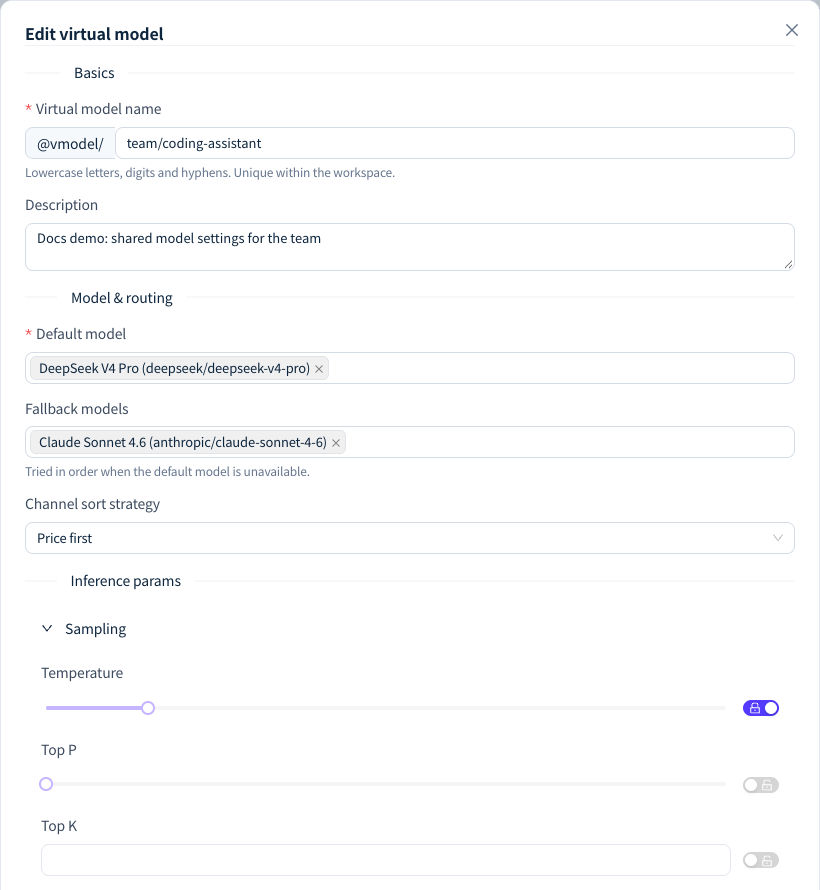
Figure 1: Confirm the primary and fallback models in the virtual model configuration; fallback models must also support the key capabilities of the original request. Demonstration data; click the image for full size.
Fallback models must support the endpoint, input types and tool calling used by the original request. The gateway does not skip a fallback model for lacking a capability; when a model does not support the request's input, the request returns 400 directly and the remaining models are not tried.
When there is no fallback
| Situation | Result |
|---|---|
A streaming request (stream: true) has started sending output, and then the upstream breaks off or times out |
No channel switch. An error event is appended at the end of the stream and the stream ends: on Chat Completions error.code is stream_interrupted, and on Responses it is a response.failed event. See Timeouts and interrupted streams |
| The channel has Only use this BYOK turned on | Only that channel's BYOK credentials are tried, and the request ends when they all fail, without platform credentials, other channels or the Default Model. When called through a virtual model or lyrouter/auto, the next candidate model is still tried, but the request no longer falls back to the Default Model |
The gateway rejects the attempt: insufficient balance (402), a guardrail model policy blocks the selected model (403 Request blocked by guardrail policy), or the selected model does not support the current endpoint or input (400 unsupported_model_api, unsupported_model_input) |
The error is returned directly, and the next candidate is not tried |
The upstream declares a generation failure in the agreed format (error.code is upstream_rejected or upstream_no_artifact, common in image generation) |
Returned directly, with no channel switch |
| Image, video and audio endpoints | Fallback happens only between channels of the same model, never to the Default Model or other models |
Client retries
The gateway already falls back internally, so the client does not need to retry every error automatically:
- For request or configuration problems such as 400, 401, 402 and 403, fix the cause before calling again; retrying the same request gives the same result.
- For 429 and 503, follow 429: rate limits and quotas and Unavailable models, and retry with bounded backoff.
- An API key with at least 100 requests within 60 seconds, more than 90% of which fail, is temporarily cut off by the circuit breaker; 4xx errors returned by the gateway itself count as failures. A program that keeps retrying through persistent failures quickly trips the breaker for its key, and repeated trips lead to a permanent ban.
Tracing a fallback
How do I tell whether a request fell back?
Answer: Open its record in the request logs and look at Upstream call attempts in the route trace. It records the status code and duration of every actual attempt and the reason for moving to the next candidate; requests that made only one attempt do not show this block. When ④ 上游调用 (upstream call) in Latency breakdown shows "N attempts", a retry happened as well. All candidates is only the sorted candidate list and does not prove every candidate was called. The route trace is shown only to the Account Owner and workspace Admins; other members can send the Request ID at the top of the log detail to the Owner for help.
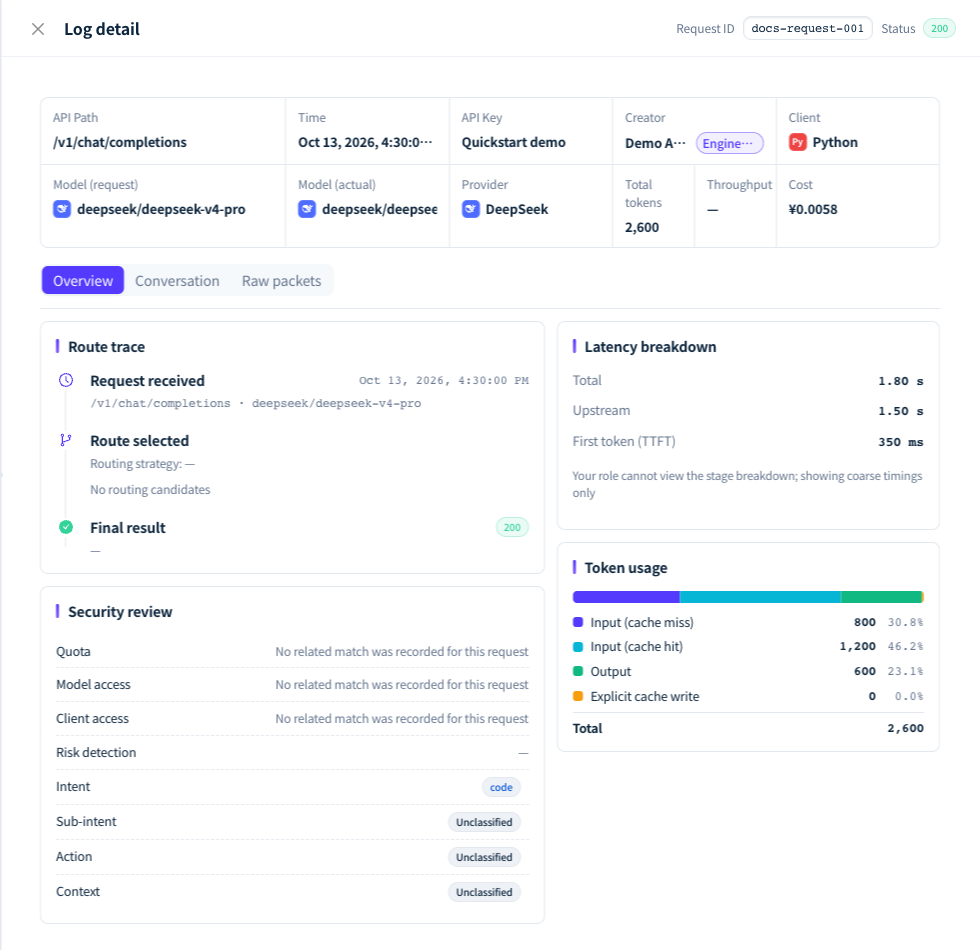
Figure 2: The route trace in the log detail shows the actual model, provider and upstream call attempts. Demonstration data; click the image for full size.
Why did a model other than the one requested answer?
Answer: When every channel of the requested model fails, or the model is not enabled in the workspace, the gateway moves to the workspace's Default Model. Model (actual) in the logs shows the model that answered. If you do not want this fallback, ask the Owner to clear the Default Model in Smart routing.
Streaming output had started when the connection dropped. Can I just retry?
Answer: The gateway never switches channels after output has started. When you receive a stream_interrupted error event or a response.failed event, or no end marker (data: [DONE], message_stop or response.completed) arrives, treat the call as failed. Calling again may generate duplicate content or trigger tools again, so the application must handle cancellation, retries and deduplication itself; see Timeouts and interrupted streams.