Unavailable models
A misspelled model name, a model that is not enabled, no usable channel or credential, an insufficient balance, and temporarily unavailable billing or configuration all show up as a model you cannot call. Find the cause in the table below by the error message in the response. When the workspace has set a default model in Smart routing, many chat requests are answered by the default model instead and never receive these errors; you can confirm this in Model (actual) in the logs.
Look up by error message
| Status | Error message (error.message) |
error.code |
Cause and fix |
|---|---|---|---|
| 400 | you must provide a model parameter |
missing_model |
The request has no model, and the workspace has no default model. Put a model ID in the request |
| 400 | invalid type for 'model': expected a string |
invalid_model |
model is not a string. Change it to a model ID string |
| 400 | This model does not support the <endpoint> API |
unsupported_model_api |
The model does not support this endpoint, for example calling the image generation endpoint with a chat model. Use a model that supports the endpoint |
| 400 | This model accepts text input only |
unsupported_model_input |
Images, audio or files were sent to a model that accepts only text. Use a model that supports that input |
| 402 | insufficient credit balance |
insufficient_credit_balance and others |
The account's Credits balance is insufficient; see "Balance and subscription" below |
| 402 | subscription expired; renew to continue |
— | The account's subscription has expired; see "Balance and subscription" below |
| 403 | Model is not available in the model plaza |
model_not_available |
The workspace has not enabled the model, or a virtual model or lyrouter/auto was used on an image, video or audio endpoint. Enable the model in the model marketplace, or use a specific model ID |
| 503 | all routed candidates exhausted |
no_route_candidate |
No model or channel can serve this request. Common causes: @vmodel/<name> is misspelled or disabled, or the model has no usable channel or credential |
| 503 | No configured credential can serve this model |
no_route_candidate |
The model's channels have no usable credential in this workspace: the platform channel is not enabled, or none of the BYOK credentials is usable |
| 503 | Platform supplier cost snapshot is unavailable |
supplier_cost_snapshot_not_ready |
The channel serving this model has no price configured yet, so the gateway cannot bill the call. Switch to another model, and give the model ID to support |
| 503 | billing balance is temporarily unavailable |
billing_maintenance and others |
The gateway temporarily cannot confirm the account balance; this is not an insufficient balance. Contact support if it persists |
| 503 | Workspace model projection is unavailable |
workspace_model_projection_unavailable |
The gateway temporarily cannot read the workspace's model configuration. This is a platform-side problem; retry later |
When the price of a BYOK channel is not ready, the error message is BYOK supplier cost snapshot is unavailable. A 500 or 504 whose response body is an HTML page means connecting to the upstream failed or waiting for it timed out; see Timeouts and interrupted streams. Errors returned by the upstream provider itself are forwarded as is, and the source in the Status explanation column of the logs shows Upstream.
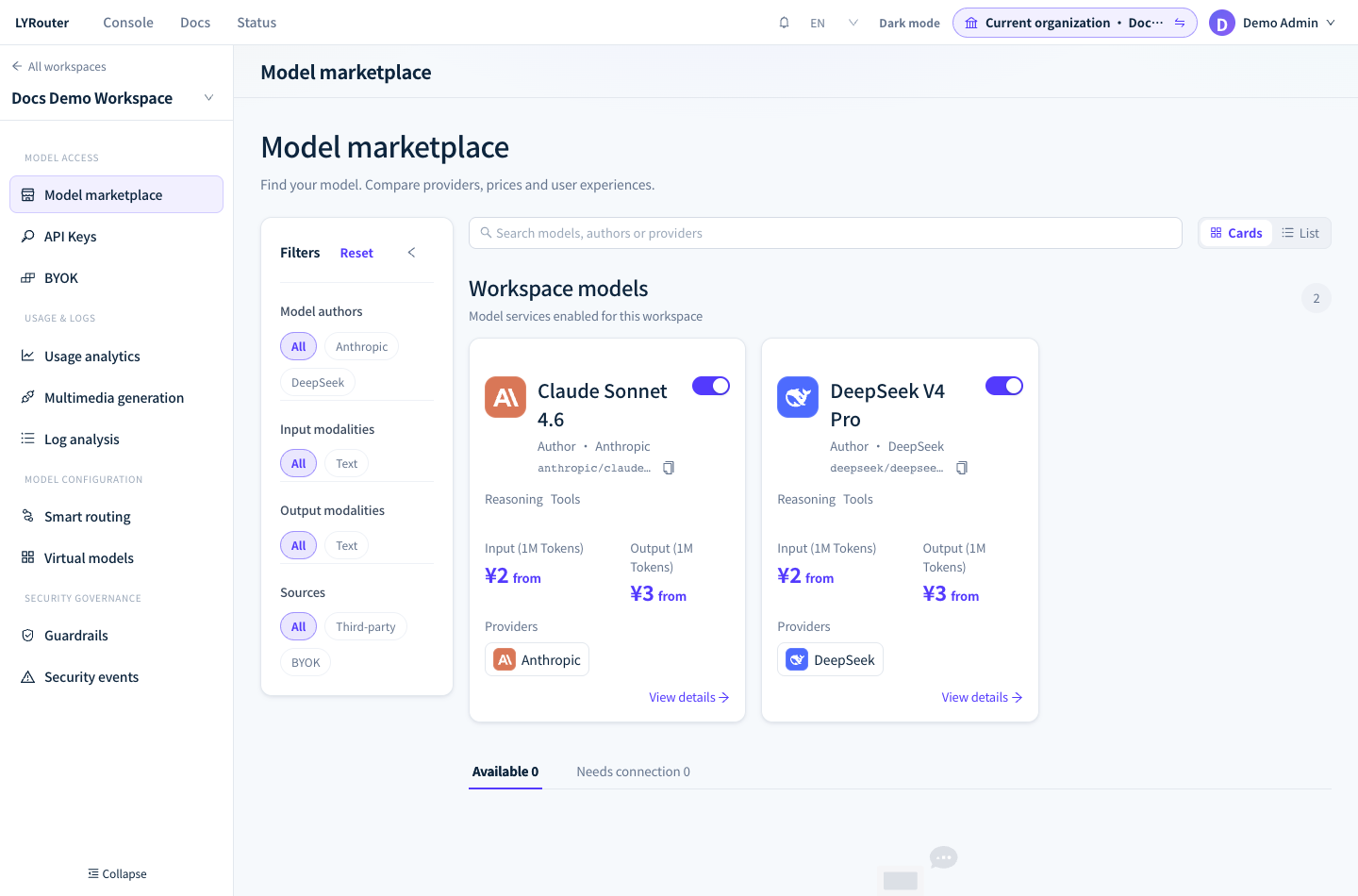
Figure 1: Check whether the model is enabled, whether its sources are active and whether it is available to you. Demonstration data; click the image for full size.
Balance and subscription
error.code |
Meaning | Fix |
|---|---|---|
insufficient_credit_balance |
The account balance is used up; or, when you use BYOK and a platform service fee is due, the balance cannot cover the fee | Top up on the Subscription & Credits page |
balance_missing |
The account has no balance record yet, usually because it has never been topped up | Top up; contact support if it still appears after you top up |
billing_entity_missing |
The gateway cannot find the billing account behind the key | A platform-side data problem; contact support |
- The balance check happens before the call: any balance above 0 lets a call start, a single call can push the balance below zero, and only the calls after it are refused. When the balance is insufficient, the gateway does not switch to another billing method or another channel.
subscription expired; renew to continuemeans the subscription has expired and its grace period has passed. Calls from every workspace under the account are refused until it is renewed. Accounts without a subscription never receive this error.- Top-ups and renewals are done by the account administrator; see Billing and Credits and Purchases, bills and invoices.
FAQ
How do I check the model name when a model is reported as missing or unavailable?
Answer: Use the system model ID, not the display name, and do not add a provider prefix yourself. Call GET /v1/models with the same API key: the list contains the model IDs that are enabled in the key's workspace and that the guardrail model policies allow this key to call, plus enabled @vmodel/<name> entries and lyrouter/auto. If a model is not in the list, it is not enabled or a policy forbids it. Virtual models and lyrouter/auto are always listed; if the model they actually select is forbidden by a policy, the call still returns 403. Model IDs are case-sensitive.
Why do I still get 503 when the model is enabled?
Answer: Enabling a model does not mean it has a usable credential. Ask the Owner to confirm in the model marketplace that at least one service source is active; with BYOK, check the credential status and model mappings in BYOK, and test the connection again. supplier_cost_snapshot_not_ready means the platform price is not ready; contact support.
Why was there no fallback to other sources when Only use this BYOK is on?
Answer: This setting restricts the model to the BYOK credentials of the chosen channel. Once they all fail, the request ends without trying platform credentials, other channels or the default model. Ask the Owner to check that channel's credentials and mappings, or, if exclusive use is not needed, switch to Prefer this Channel; see Retries and fallback.
What should I check next if calls still fail after switching models?
Answer: Confirm that the replacement model supports the original request's endpoint, input types and tool calls, then match the error message against the table above. Record the call time, model, API key name and error message, find the request in the request logs, and check Status explanation and the Request ID at the top of the log detail.