Auto routing
Set the request's model to lyrouter/auto, and the gateway picks the model to call from the models enabled in the workspace, based on how difficult the request's task is. It suits scenarios that tolerate a changing model, such as chat and coding assistants. For applications with strict requirements on output structure or model behavior, name the model ID directly, or pin the model with a virtual model.
Calling Auto
Every workspace can call lyrouter/auto directly, and GET /v1/models lists this name too. Setting the environment variables is covered in Your first model call:
curl "$LYROUTER_BASE_URL/v1/chat/completions" \
  -H "Authorization: Bearer $LYROUTER_API_KEY" \
  -H "Content-Type: application/json" \
  -d '{"model":"lyrouter/auto","messages":[{"role":"user","content":"Write a quicksort function in Python"}]}'
- Supported endpoints:
/v1/chat/completions,/v1/messagesand/v1/responses. Image, video and audio endpoints do not support Auto and return 403Model is not available in the model plaza; use a specific model ID instead. - Time to first token: the gateway identifies the task type before forwarding the request, so the time to first token is slightly longer than calling a model directly.
How the model is picked
- Identify the task type: the gateway judges the intent from the last user message, for example Build & debug or Transform content.
- Map to a difficulty tier: each intent category maps to one difficulty tier.
- Sort the candidates: the tier's models come first, in the priority order set by the platform; the other models in the candidate scope follow in alphabetical order of model ID. When no task type is identified, all candidates are sorted alphabetically.
| Difficulty tier | Intent categories | Preferred model type |
|---|---|---|
Hard (hard) |
Build & debug, Analyze & calculate, Decide & plan, Automate workflows, Review & validate, Governance & compliance | Flagship reasoning and coding models, such as deepseek/deepseek-v4-pro and qwen/qwen3.7-max |
Medium (medium) |
Create content, Summarize & synthesize, Extract & structure, Creative media, Communication & cases, Learn & practice | Balanced mainstream models, such as anthropic/claude-sonnet-4.6 and qwen/qwen3.7-plus |
Easy (easy) |
Ask & explain, Transform content | Fast, low-cost small models, such as anthropic/claude-haiku-4.5 and deepseek/deepseek-v4-flash |
- The platform maintains the priority lists, and workspaces cannot change them. A model on a list is chosen only when it is in the candidate scope and enabled in this workspace.
- The gateway tries the candidate models in order and moves to the next model only after every channel of the current one fails; the workspace's Default Model comes last.
- Channels of the same model are not sorted by the multi-channel routing strategy; Prefer this Channel and Only use this BYOK in BYOK still apply.
Setting the candidate scope
The current Account Owner clicks Advanced settings in the Auto smart routing row of the Smart routing page, sets the candidate scope in the drawer, and clicks Save Auto settings. Account Members do not see this page, but they can call lyrouter/auto directly.
- All enabled models (the default): every model enabled for this workspace in the model marketplace is a candidate.
- Specific models: check enabled models, or type a model ID or wildcard rule in the search box and press Enter to add it; for example,
anthropic/*matches every model starting withanthropic/. Manually added entries carry a "manual" tag.
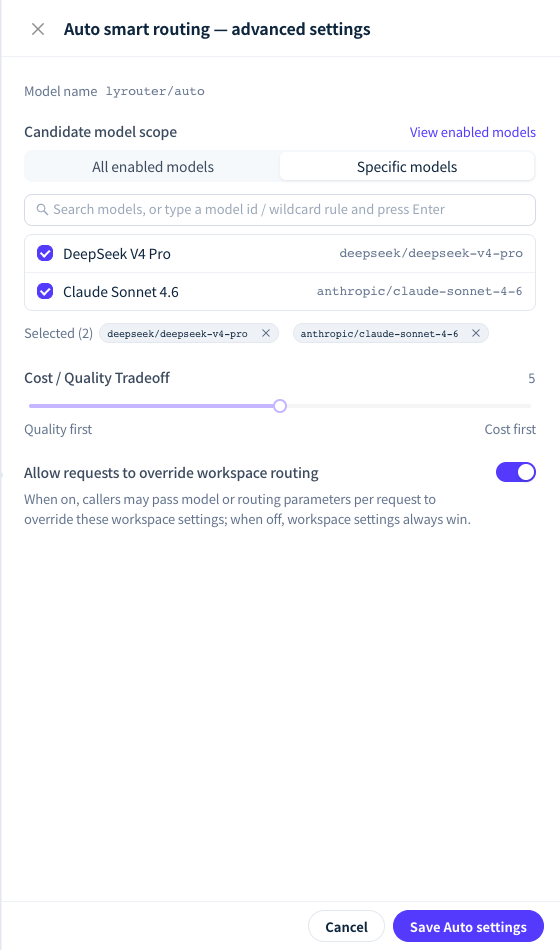
Figure 1: The candidate scope in Auto advanced settings decides which models can be chosen; the cost / quality tradeoff and request override switch do not affect calls yet. Demonstration data; click the image for full size.
- Only enabled models qualify: a model ID you add that is not enabled in this workspace never becomes a candidate. When the scope contains no usable model, the request returns 503
all routed candidates exhausted; if a Default Model is set, it answers instead. - Keep only chat models: when the selected model does not support the current endpoint (for example, an embeddings or image model picked for a chat endpoint), the request returns 400
unsupported_model_apidirectly and does not move to the next candidate. If you use All enabled models and the workspace has non-chat models enabled, switch to Specific models. - Affects only
lyrouter/auto: calls that name a model ID are not limited by the candidate scope. To limit which models a workspace can call, disable models in the model marketplace or use Model access.
The Cost / Quality Tradeoff slider and the "Allow requests to override workspace routing" switch in the drawer are only saved and do not affect calls yet: Auto picks models by task difficulty alone, and requests have no parameter that overrides routing settings.
Verify
After a call, open its record in the request logs. In the route trace:
- Virtual model shows
lyrouter/auto; - Routing strategy shows
intent:hard,intent:mediumorintent:easy, orintentwhen no task type was identified; - Model (actual) shows the model that answered.
Compare the actual model, latency and cost on a fixed set of test tasks before deciding whether to use Auto in production.