401 / 403: authentication and access
A 401 means the gateway did not recognize the API key in the request; a 403 means the key is valid but this request was refused. Read error.message and error.code in the response body first, then find the cause in the tables below. When you call through /v1/messages, errors are converted to the Anthropic format and no longer carry error.code; go by message instead.
401: the API key was not recognized
Error message (error.message) |
Cause | Fix |
|---|---|---|
missing credentials |
The request carries no API key | Add Authorization: Bearer <API Key>; Anthropic-style clients can also use x-api-key |
invalid authorization scheme, expected 'Bearer' |
The Authorization header is not in the Bearer <API Key> format. Bearer is case-sensitive, so bearer sk-..., the bare key and Basic ... are all rejected; Bearer with no key after it also returns this error |
Use the Bearer <API Key> format |
invalid api key |
The gateway cannot find this key: it was copied incompletely or with spaces or line breaks; the key was deleted, disabled or has expired; its workspace or creator has been deactivated; or the key was just created and has not reached the gateway yet (usually a few seconds) | Copy the full key again; if the plaintext is lost, delete the old key and create a new one, see Workspaces and API keys |
api key verification unavailable |
The platform's key verification service is temporarily unavailable; this has nothing to do with whether the key is correct | Retry later; if it persists, check Service status |
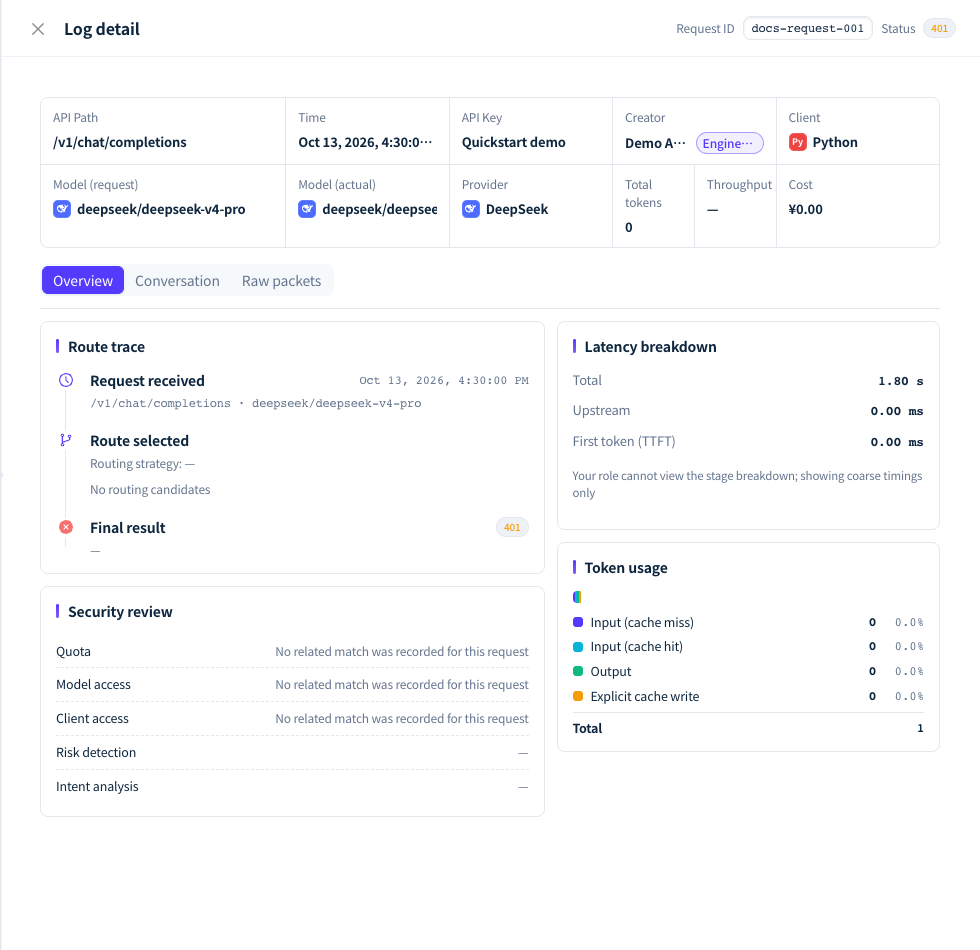
Figure 1: When authentication fails, check the status, request identifier and error source in the log detail; the example shows an invalid key. Demonstration data; click the image for full size.
- Use a LYRouter API key, not a provider's API key or your console login session.
- When a request carries both
Authorizationandx-api-key, the gateway reads onlyAuthorization. - For tools that read the key from environment variables (such as Claude Code and Codex), open a new terminal or reload your shell configuration after changing it.
403: the request was refused
Error message (error.message) |
error.code |
Cause and fix |
|---|---|---|
api key expired |
— | The key is past its expiry time. Create a new key to replace it; some time after expiry, the same key returns 401 invalid api key instead |
your IP address is not allowed |
— | The key has an IP allowlist and the request's source IP is not on it. The gateway checks the egress IP the request arrives from; when you call from a corporate network, through a proxy or from a cloud server, that IP may differ from the one your machine shows |
ip access control misconfigured |
— | The key's IP allowlist is empty or contains an invalid IP / CIDR, so the gateway rejects every request. Ask the key's creator or the Account Owner to fix the allowlist |
api key workspace is unavailable |
— | The gateway temporarily cannot read the configuration of the key's workspace. This is a temporary platform-side problem; retry later |
Model is not available in the model plaza |
model_not_available |
The key's workspace has not enabled the model, or a virtual model or lyrouter/auto was used on an image, video or audio endpoint; see Unavailable models |
Request blocked by guardrail policy |
guardrail_* |
The request matched a blocking guardrail policy; see below |
Response blocked by guardrail policy |
guardrail_sensitive |
The answer to a non-streaming request matched a sensitive-data policy. The upstream had already generated the answer, so the call is billed as usual |
Subject is blocked by an active security ban |
guardrail_subject_banned |
Guardrails have banned the key, and every request is refused during the ban. The ban lifts at the automatic unban time set in the policy, or earlier when the Owner lifts it in Security events |
该 API Key 已被永久封禁,无法恢复,请删除后创建新的 API Key。 (This API key has been permanently banned and cannot be restored; delete it and create a new API key.) |
api_key_permanently_banned |
The key tripped the error-rate circuit breaker for the 5th time and is permanently banned; the ban cannot be lifted. Right after the ban, later requests are rejected by the circuit-breaker check with 该 API Key 因多次高错误率请求已被永久封禁,无法恢复,请删除后创建新的 API Key。 (This API key has been permanently banned after repeated high-error-rate requests and cannot be restored; delete it and create a new API key.); once the ban has synced to the gateway, they return the message in this row instead. Both mean the same thing. Fix the program that keeps failing first, then create a new key; see 429: rate limits and quotas |
Guardrail blocks
The Request blocked by guardrail policy message does not include the policy name or the matched content. Use error.code to tell which type of policy matched:
error.code |
Policy type |
|---|---|
guardrail_client |
Client access: restricts calls by source IP, tool name or User-Agent |
guardrail_context |
Intent security: the request's intent was judged risky |
guardrail_sensitive |
Sensitive data: the request contains personal information, credentials or sensitive keywords |
guardrail_injection |
Prompt injection: the request looks like a prompt injection |
guardrail_model |
Model access: the chosen model is not in the allowed range |
Retrying the same request gives the same result. The caller can change the request content or switch to an allowed model; to see match details or adjust the policy, ask the Account Owner to check Guardrails and semantic auditing. Model policies check the model actually selected, and they apply to virtual models too.
Tell whether an error came from the gateway or the upstream
The Status explanation column in the request logs list shows whether the source is Gateway or Upstream, along with the specific reason. An upstream 401 or 403 usually means the upstream rejected the credential: with BYOK, ask the Owner to confirm with the provider that the credential is valid and has enough quota, then test the connection again in BYOK. When the upstream returns only a status code without a body, the gateway fills in error.code (such as upstream_unauthorized or upstream_forbidden) and adds "generated_by": "ai-gateway" to mark that this content was generated by the gateway.
FAQ
Why does an API key call return 403 for a model I can see in the console?
Answer: A key can only call models enabled in the workspace it belongs to. Seeing a model in the model catalog does not mean that workspace has enabled it, nor that the model policies for the department, member or key allow it. First confirm in that workspace's Model marketplace that the model is enabled, then ask the Owner to check the model policies in Guardrails; see Model access. Changing the model's display name in the client does not get around the permissions.
What should I include when reporting an authentication problem?
Answer: Responses do not carry a request ID. Record the call time, endpoint, model, the API key's name and the error message; if you can find the request in the logs, add the Request ID from the top of the log detail. 401 requests cannot be attributed to any key and do not appear in the logs. Do not send the API key itself, the full Authorization header or sensitive input or output.