Timeouts and interrupted streams
The gateway waits for the upstream with a 6-minute idle timeout. When connecting to the upstream fails or the wait times out, the gateway first moves on to the next channel; when every channel fails, it returns 500 or 504 with an HTML page as the response body instead of JSON. Once a streaming request has started sending output, the gateway no longer switches channels; if an error occurs midway, the gateway appends an error event at the end of the stream and closes the connection. Clients should treat a stream that never received its end marker as failed, and decide for themselves how to retry and deduplicate.
504 / 500: the response body is an HTML page
| Status | Cause | Status explanation in the logs |
|---|---|---|
| 504 | Waiting for the upstream's response timed out, or connecting to the upstream timed out | Gateway + "Upstream request timed out" |
| 500 | Connecting to the upstream failed (for example, the connection was refused), or reading the upstream's response failed | Gateway + "Could not connect to upstream; no response received" or "Upstream request or response read failed" |
- These two responses have no JSON error body; they return an HTML error page, and some SDKs report an error such as "unable to parse the response". Handle them by HTTP status code, and do not rely on
error.message. - Before returning, the gateway has already tried other channels under the rules in Retries and fallback, and returns the result of the last attempt only after every candidate has failed.
- The source in Status explanation shows Gateway because the gateway ended the request, but the cause lies in the connection between the gateway and the upstream. If it persists, check Service status or switch to another model.
How the upstream timeout works
The gateway's read timeout when calling the upstream is 360 seconds (6 minutes):
- Non-streaming requests: the request times out if the upstream returns no response within 6 minutes. For very long output, use
stream: trueinstead. - Streaming requests: the timeout is measured between two consecutive pieces of data, so the request does not time out as long as the upstream keeps producing output. Before output starts, the gateway also waits at most 6 minutes.
- The clock restarts after a channel switch: after one channel times out, the gateway moves to the next channel and waits again, so the total time of one request can exceed 6 minutes.
Errors after streaming output has started
Once the response headers and the first piece of content of a streaming request have been sent, the gateway can no longer switch channels. If the upstream breaks off or times out at this point, the gateway appends an error event at the end of the stream and then closes the connection:
Chat Completions:
data: {"error": {"message": "upstream timed out after the response had started", "type": "api_error", "code": "stream_interrupted"}}
Anthropic Messages (/v1/messages):
event: error
data: {"type": "error", "error": {"type": "api_error", "message": "upstream timed out after the response had started"}}
Responses (/v1/responses): a response.failed event is appended, with response.error.code server_error.
event: response.failed
data: {"type": "response.failed", "sequence_number": 42, "response": {"id": "resp_...", "object": "response", "status": "failed", "error": {"code": "server_error", "message": "upstream timed out after the response had started"}}}
- On a timeout,
messageisupstream timed out after the response had started; on a connection or read failure, it isupstream failed after the response had started. - Error events that the upstream provider itself sends in the stream (for example Anthropic's
overloaded_error) are passed on to you in the protocol you called. - The official OpenAI and Anthropic SDKs raise an API error when they receive an error event in their format.
- In the logs, Status for such a request is 200 (the response headers had already been sent), and Status explanation shows Gateway + "Upstream request timed out" or "Upstream request or response read failed".
No end marker means failure
After an error event, the stream contains no end marker. Use the end marker defined by the protocol to judge whether the output is complete, and treat the call as failed if you did not receive it:
| Endpoint | Marker of a normal end |
|---|---|
| Chat Completions | data: [DONE] |
| Anthropic Messages | message_stop event |
| Responses | response.completed event |
When the upstream drops the connection without sending any error event, the stream also ends without an end marker; treat it as a failure too. The event structure of each protocol is in Streaming.
Client and proxy settings
- Client timeout: set it longer than 6 minutes so the client does not disconnect first. For streaming requests, prefer a timeout on the gap between reads over a timeout on the whole request.
- Parse complete events: SSE events are separated by blank lines, and one network chunk may contain half an event or several events. Do not treat each chunk as a complete piece of JSON.
- Your own proxy: if a reverse proxy such as Nginx sits between your application and LYRouter, turn off response buffering (set
proxy_buffering offin Nginx) and set the proxy's read timeout longer than 6 minutes. Otherwise streamed content is held back and arrives as one large block, or the proxy disconnects early.
Retries and deduplication
- Interrupted streams: when you receive
stream_interruptedorresponse.failed, or no end marker, do not treat the partial output you received as the complete result. Calling again generates a new answer, which may differ and may trigger tool calls again; your application must deduplicate tool operations that already ran, for example by attaching a business idempotency key to each operation. - 504 / 500: the gateway has already switched channels internally, so the client only needs to retry with capped exponential backoff. Do not retry back to back without a delay.
- Persistent failures: an API key with many failed requests within 60 seconds is temporarily circuit-broken and receives 429
api_key_circuit_open; see 429: rate limits and quotas.
Find it in the logs
Find the request in the request logs and open its detail:
- Latency breakdown: if ④ 上游调用 (④ upstream call) takes most of Total, the time was spent at the upstream. When "· N attempts, longest X" appears next to it, the gateway switched channels, and each attempt may have waited close to 6 minutes.
- TTFT: the TTFT column of the log list (turn it on under Columns) shows how long the upstream took before it started sending output.
- Route trace: under Upstream call attempts, each attempt shows a status such as Timeout or Connection failed; see Inspecting request routing.
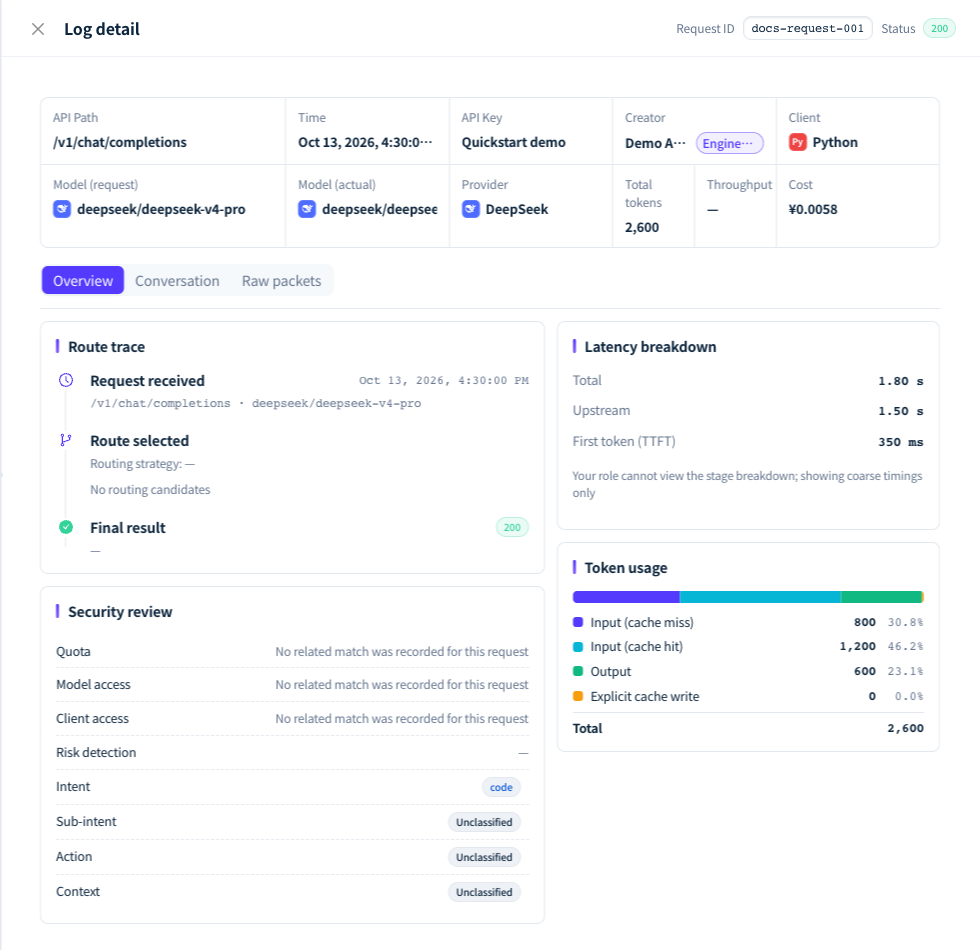
Figure 1: Compare Total, Upstream and First token (TTFT) in the latency breakdown of the log detail. Demonstration data; click the image for full size.
FAQ
Why does the client report a timeout while the log shows 200 for the request?
Answer: Usually the client or a proxy in between closed the connection first, and the gateway still completed the call. Compare Latency in the log with the client's timeout setting; Time in the log is when the request finished, so subtracting Latency gives the time the request reached the gateway. Raise the client timeout above 6 minutes, or switch to a streaming request.
Why does a streaming response take a long time to deliver its first piece of content?
Answer: Check TTFT in the log first. A long TTFT means the upstream was slow to start output; retry later or switch to another model. If TTFT is normal but the client receives content late, check whether a proxy in between is buffering the response.
What should I check when parsing JSON from a streaming response fails?
Answer: Make sure the parser reads complete SSE events and can handle lines that are not JSON, such as data: [DONE]. If the request failed before output started, the response is an ordinary error response rather than an event stream: requests rejected by the gateway usually have a JSON error body, while 500 and 504 return an HTML page. Check the status code and Content-Type first.
What should I include when reporting a timeout problem?
Answer: Gateway responses do not carry a request ID. Find the request in the logs and include the Request ID from the top of the log detail, the call time, the model, whether the call was streaming, the client's timeout setting, and the error message the client received or the last few events it got.