Billing and Credits
LYRouter bills in Credits: an organization has a single Credits balance, shared by every workspace and API key in it. Calls to platform models are charged in Credits by actual usage, and BYOK calls are charged a platform service fee per call; once the balance falls to 0 or below, calls return 402. Team and Enterprise editions also have a per-seat subscription. After it expires there is a 7-day grace period; after that the console becomes read-only and calls return 402 subscription expired; renew to continue.
Credits balance
The current Account Owner checks the balance on the Subscription & Credits page in the Organization management group of the sidebar: the "Credit balance" card at the top of the "Purchase" tab shows "Total Credits", an approximate CNY amount converted at the exchange rate, and the two parts "Paid" and "Granted". Account Members do not see this page; when they run out of balance or the subscription expires, they should contact the Owner.
| Paid balance | Granted balance | |
|---|---|---|
| Source | The face value of resource packs you buy | Sign-up and identity verification bonuses, the "Included Credits" of subscription plans, the bonus part of resource packs, and redeemed benefit codes and vouchers |
| Order of deduction for calls | Used after the granted balance runs out | Used first |
| Offsetting renewals, seat add-ons and auto-renewal | Yes | No |
| Refunds | — | Not refundable |
- The balance can go negative: a single call can push the balance below zero. The negative amount is recorded on the paid balance, and a top-up first covers it. The granted balance never goes negative.
- Subscription Credits arrive at once: the "Included Credits" of a subscription plan are added to the granted balance in full when payment succeeds. They are not split by month and do not reset each cycle.
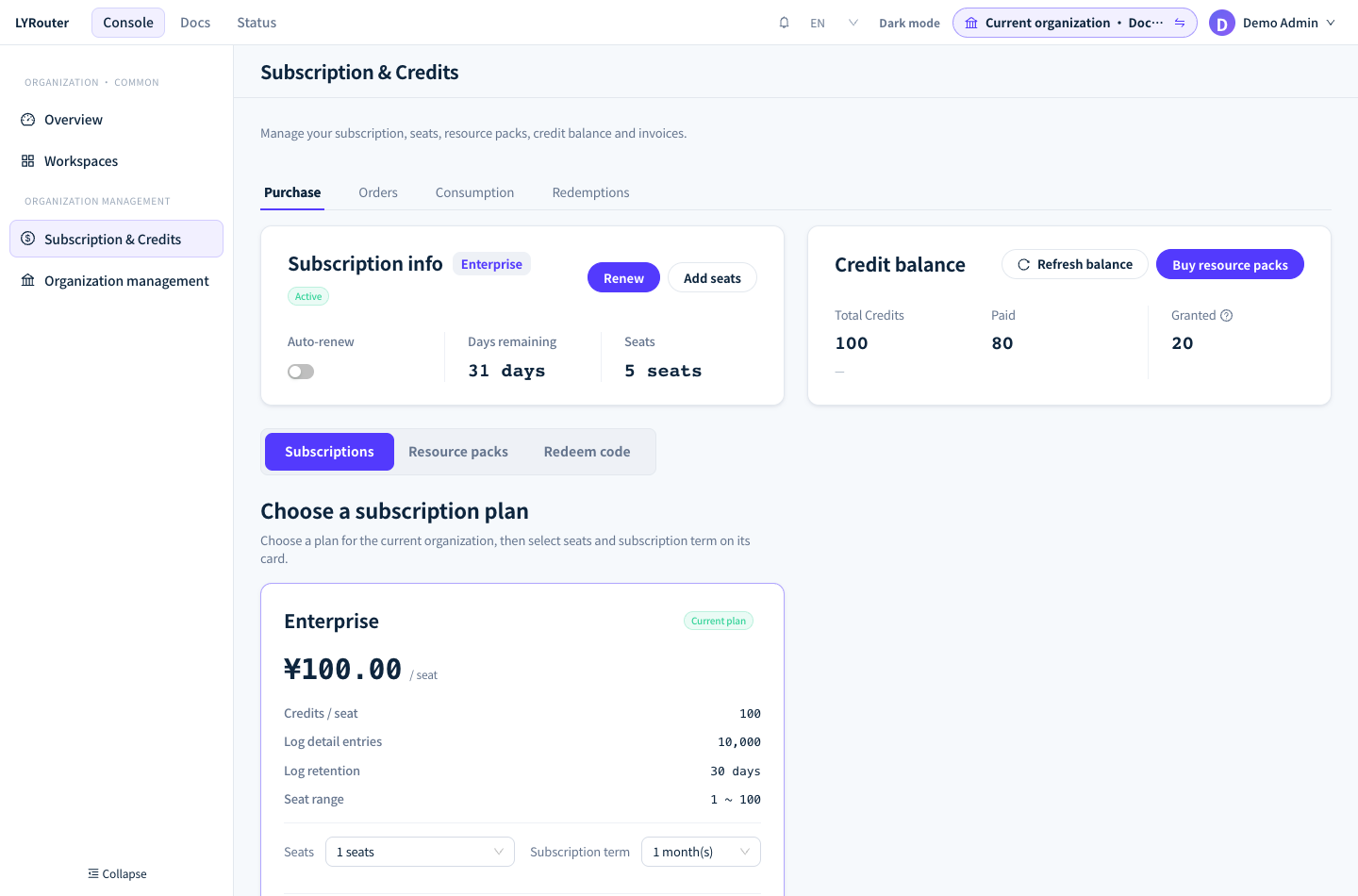
Figure 1: The top of the Purchase tab shows subscription info and the Credit balance, which is split into paid and granted balance. Demonstration data; click the image for full size.
How calls are charged
| Call | Credits charged? | Amount |
|---|---|---|
| Successful platform model call | Yes | The call's actual usage at the model's prices, converted to Credits |
| Successful BYOK call | Yes | Not charged by Tokens (you settle provider fees directly with the provider); one platform service fee per call, see BYOK fees and credentials |
| Upstream error or connection failure | No | — |
| Gateway retries with another credential, channel or fallback model | Once | Only the final successful attempt is charged; failed attempts are free |
- Prices are frozen at request time: every call is calculated with the prices and exchange rate in effect when the request was made, and later price changes do not affect calls already made. How to estimate costs is covered in Estimating costs and cache pricing.
- The BYOK service fee is reserved first: before the gateway sends a BYOK request to the provider, it reserves the service fee from the balance. The fee is deducted only if the call succeeds and is returned if it fails. If the balance cannot cover the service fee, the request is not sent to the provider and 402 is returned directly.
Insufficient balance and 402
The gateway checks the organization balance before every call: a balance above 0 lets the call through, and a balance of 0 or below returns 402 insufficient credit balance (error.type is insufficient_quota). The check happens only before a call, so the last call let through can push the balance negative, and only later calls are rejected. When the balance is insufficient, the gateway does not switch to another channel or another billing method.
error.code |
Meaning | What to do |
|---|---|---|
insufficient_credit_balance |
The balance is used up, or for a BYOK call the balance cannot cover the platform service fee | Top up under "Resource packs" |
balance_missing |
The organization has no balance record yet, usually because it has never topped up | Top up; if it still appears after topping up, contact support |
billing_entity_missing |
The gateway cannot find the billing account for this API key | A platform-side data problem; contact support |
Calls resume as soon as the top-up arrives and the balance is above 0 again; you do not need a new API key. Two other errors differ from insufficient balance: 503 billing balance is temporarily unavailable means the gateway cannot confirm the balance for the moment, see Unavailable models; a 429 error that mentions credits means a quota or key budget is used up, see Budgets, quotas and rate limits.
When the page balance and the gateway disagree
The gateway decides with the real-time balance, but when the "Credit balance" card cannot get the real-time balance, it falls back to the reconciliation ledger, which can lag by a few minutes. The card then shows this note below it:
This balance comes from the reconciled ledger and may lag by several minutes. The gateway enforces the real-time balance, so requests can be rejected even while a balance is still shown here.
When you see this note, trust the call results and top up in time. Right after a top-up or redemption, the card may show "A credit update is being synchronized. The displayed balance may be temporarily delayed."; click Refresh balance a little later. The total updates before "Paid" and "Granted", so for a short while the three may not add up; this is normal.
Subscriptions: editions, seats and trials
- Who can subscribe: subscriptions are for Team and Enterprise organizations. A Team organization can subscribe only to Team plans, and an Enterprise organization only to Enterprise plans. The Personal edition is free, and its subscription card shows "Personal (Free)"; clicking any plan shows "The Personal edition cannot subscribe" with Create a team and Create an enterprise. Team requires the Owner to complete personal identity verification, and Enterprise also requires enterprise verification; see Teams, members and roles.
- Plan cards: under "Subscriptions", switch the billing cycle between "Monthly" and "Yearly". Each card shows the price per seat and its "Credits / seat", "Log detail entries", "Log retention" and "Seat range". Choose "Seats" and "Subscription term" (1–36 billing cycles) on the card; "Amount due" is unit price × seats × cycles. The card shows the actual prices.
- Trials: cards tagged "Trial" offer a trial. The button is Start free trial (no payment, activated immediately) or Start paid trial (paid through the regular plan flow). Each organization can trial each edition only once, and a Team trial is also limited to once per verified identity of the Owner; cards already trialed show "Trial used". Trials do not auto-renew.
- Seats: the organization's members plus pending invitations cannot exceed the seat count. When the seats are full, add seats before inviting more people; see Teams, members and roles.
The "Subscription info" card shows the status tag "Free", "Trialing", "Active", "Grace period" or "Subscription expired", along with "Days remaining", "Validity" and "Seats". Placing orders, renewing, adding seats and auto-renewal are covered in Purchases, bills and invoices.
Expiry, grace period and freeze
| Stage | Subscription info card | Console | API calls |
|---|---|---|---|
| Before expiry | "Active" or "Trialing" | Normal | Normal |
| Within 7 days after expiry | "Grace period"; the Subscription & Credits page shows "Your subscription is in its grace period and will be suspended in N day(s). Please renew." | Normal | Normal |
| After the grace period | "Subscription expired" | Pages can be viewed but not changed | 402 subscription expired; renew to continue |
| After a successful renewal | "Active" | Restored | Restored |
- The console while frozen: every page shows "Your subscription has expired. Pages are read-only until you renew." at the top, and any create, edit or delete action shows "Your subscription has expired. Renew to make changes." Renewal, top-up, redemption and invoicing on the Subscription & Credits page keep working; read-only actions such as exporting logs, as well as changing your password, identity verification, accepting invitations and marking messages as read, are not affected either.
- Calls while frozen: the 402 applies to every workspace and API key of the organization, BYOK calls included. Topping up does not help here; you need to renew.
- The balance is kept: the freeze does not clear the Credits balance, and you can keep using it after renewing.
Balance and subscription reminders
The current Account Owner clicks Alert settings in Message center to open the "Alert notifications" page, and sets reminders among the "Billing" alert rules:
| Rule | When it fires |
|---|---|
| Subscription expires in 7 days, Subscription expires in 1 day | Before the subscription period ends |
| Trial expires in 7 days, Trial expires in 1 day | Before the trial ends |
| Auto-renewal in 7 days, Auto-renewal in 1 day | Notifies the expected renewal amount and whether Credits are sufficient |
| Auto-renewal succeeded, Auto-renewal failed | When an automatic renewal completes or fails |
| Subscription grace period, Subscription expired | When the subscription status changes |
| Low Credits balance | When the balance falls below the "Low-balance threshold" you set |
| Credits exhausted | When the balance runs out |
Checking actual charges
How many Credits each call actually cost is shown authoritatively on the "Consumption" tab of the Subscription & Credits page. The table lists "Request time", "API key", "Workspace", "Creator", "Department", "Model", "Credits consumed" and "Request ID" for each request, and "Total consumed" at the top is the total for the selected time range.
- Time range: the last 30 days by default; a single query cannot exceed 90 days.
- Settled requests only: a call that just happened appears only after it is settled. When the page shows "Consumption attribution is still syncing, so attributed rows may temporarily differ from the settled total", refresh a little later.
- Finding a single request: copy the "Request ID", open the matching workspace and search for it in the search box of the logs.
- "Creator" is the creator of the API key: when several people share one key, you cannot tell who made a call. To account per person, create a separate key for each person.
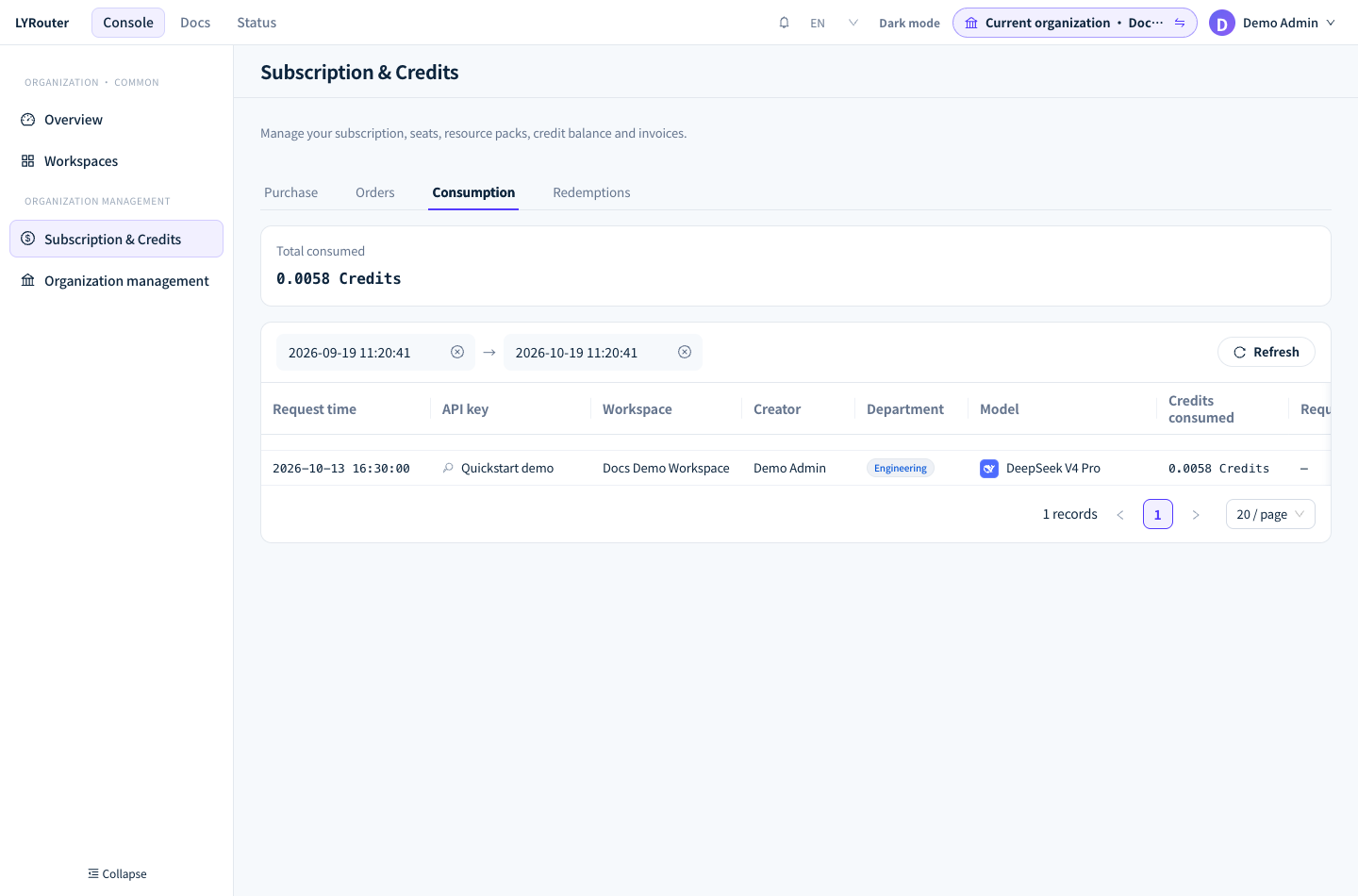
Figure 2: Consumption lists the time, API key, workspace, creator, department, model and Credits consumed for each request. Demonstration data; click the image for full size.
Cost in Usage analytics and in the logs is an amount in CNY for analyzing usage and cost; to check how many Credits the account was charged, use "Consumption".
FAQ
The console still shows a balance, but calls return 402. Why?
Answer: Read the error message first. subscription expired; renew to continue means the subscription is past its grace period and needs renewing; it has nothing to do with the balance. With insufficient credit balance, the gateway decides with the real-time balance, while the balance card may come from a reconciliation ledger that lags by a few minutes (the card shows a note below it). The actual balance is used up, so top up.
How soon can I make calls again after topping up?
Answer: Once the order becomes "Completed", the Credits are added to the balance, and calls resume as soon as the balance is above 0 again; you do not need a new API key. If the order is still "Processing", wait a moment. If calls still return balance_missing after topping up, contact support with the order number.
Can the granted balance be used for renewal?
Answer: No. Renewals, seat add-ons and auto-renewal can only be offset with the paid balance; the granted balance only pays for calls. Before renewing, make sure the paid balance is enough, or pay by scanning the QR code.